DGQF and DQL as I Understand Them

Thu Jul 26 12:27:59 EDT 2018

Tags: domino dgqf

At CollabSphere this year, the big information coming from HCL was detail about the Domino General Query Facility (DGQF) and its associated language, Domino Query Language (DQL). They originally announced this a few weeks ago, but it was good to have had some time to let the dust settle and to see the specifics.

Because it was discussed alongside the domino-db Node.js package and because it's one of the first real new ways we'll interact with data in a Domino DB in a while, it's a bit difficult to identify just what it is and what it is not. Here's how I understood it:

What DGQF Is

DGQF is, at least conceptually, a "meta" layer on top of the existing NIF indexing facility. It doesn't provide a core change to the actual storage of documents, but instead treats existing view indexes as (roughly) analagous to both SQL table indexes and SQL views. It trawls through the design elements of a database to analyze their selection formulae and columns to use applicable ones as implicit indexes and also to allow access to arbtirary collections within queries.

Implicit Indexes

Other than the design collection and the "optimize document table" option in a DB, an NSF doesn't really have much in the way of indexing note contents by default. So, if you have a query asking for all documents where FirstName is Bob, a program has no choice but to look through every document for that key/value match. If, however, you create a view that has a column showing the FirstName field, you now have a much-faster index you can use. It's this sort of view that the DGQF picks up on implicitly, using them to accelerate queries: views showing all documents with either a default sort or "click to sort" column showing explicitly a field (and not a formula).

Access to Arbitrary Collection Data

For those qualifying views plus others, you can reference a view by name or alias to compare to a column value by programmatic name (often either the field name for simple columns or something like $4 by default for formulas).

"In" clauses

Additionally, you can use view (and folder, I think) names to refine queries for documents that are in one or more of these collections, equivalent to an "in" subquery or view reference in SQL

What DQL Is

In short, DQL is the human-readable query language used to access DGQF. It's reasonably SQL-like (though it is not SQL) and tends to look like FirstName='Bob' and in all ('Managers', 'Active Users'). This is the language you will use, and so "DGQF" and "DQL" will generally refer to the same thing in practice.

In practice, this is implemented as a new method on the Database class in each high-level language supported by Domino, plus a Node-styled variant in domino-db.

What DGQF and DQL Are Not

Since DGQF sits on top of NIF (and probably the FT index eventually), it's not a core change to data storage. Eventually, the same abilities and limits of Domino remain as they are with respect to this.

Additionally, DQL is, I believe, a query language only: it does not provide a mechanism for creating, modifying, or deleting existing documents. Instead, it is essentially a super-powered and much-smarter version of database.search(…): you can use it to find documents and the processing of them is up to your program.

That last point was a bit muddied by its pairing with the domino-db Node.js package: the Node.js package provides bulk operations that are paired with DQL queries, but that is a function of that library specifically, not DQL or DGQF.

Why It's Cool

Though it's not a reworking of the core NSF, what DGQF does do is abstract away a lot of the manual looping and lookups that we've always had to do, and it allows the system to optimize and do things more efficiently than when written out procedurally. So, while there's theoretically nothing that DGQF does that we couldn't do before, it allows us to do those things with far, far less code and with automatic optimization.

This brings Domino something that SQL servers have enjoyed for a long time. With a SQL statement, you can analyze the trouble spots of a slow-running query and add indexes to improve the speed, with the tooling helping to explain what's going on. DGQF+DQL brings this along for the ride: when you execute a DQL query, you have the option to dump out this "explain" output to see what specifically the facility did, which views it used, and how long each step took. So, if you have a long-running query, you can look to see if you can add an "index" view to automatically speed it up without having to change your code. And, since the language is an abstraction over the task of querying and not the sort of "burned in" process of a normal getNextDocument loop, it can be optimized and short-circuited by the underlying system without the developer having to know the decades of built-up knowledge of how to efficiently search a DB.

All in all, this is a very welcome addition to the server, and it certainly should improve a lot of common tasks.

Reforming the Blog in Darwino, Part 4

Fri Jul 20 18:59:51 EDT 2018

Tags: java darwino
  1. Sep 15 2016 - Reforming the Blog in Darwino, Part 1
  2. Sep 26 2016 - Cramming Rails Into A Maven Tree
  3. Feb 16 2017 - Reforming the Blog in Darwino, Part 2
  4. Jul 18 2018 - Reforming the Blog in Darwino, Part 3
  5. Jul 20 2018 - Reforming the Blog in Darwino, Part 4

Last time, I went over my switch in tack for how I'm making the new version of my blog, and my overall focus on picking an interesting stack of JEE technologies. In this post, I'm going to start diving into the implementation of the UI, though I think that it will make sense to dedicate two posts to it.

The biggest decision I made with the UI side of this app is that I didn't want to make a client-side JS app. There's a reason they're so ascendant, and I find development with React or Stencil pretty enjoyable, but I wanted to go a different route here for a few reasons:

  • For a blog, a CSJS app is wildly overkill, and, in fact, would require extra work to fulfull one of the basic requirements of a blog, which is being web-crawler friendly.
  • I want to see how svelte I can make the client payload.
  • Skipping a JS framework (and a CSS one) is a great way to brush up on what plain HTML and CSS are capable of nowadays.
  • Unlike a typical Darwino app, my only target is a full-on Java web server, so I'm not held back on the Java side by the capabilities, say, of Dalvik on Android 4.
  • Part of me misses the simplicity of my early PHP days, albeit not the language.

The Java Side

I decided to go with the MVC 1.0 draft spec because it lets me write extremely focused code. Here is the controller for the home page:

package controller;

import javax.inject.Inject;
import javax.mvc.Models;
import javax.mvc.annotation.Controller;
import javax.ws.rs.GET;
import javax.ws.rs.Path;

import model.PostRepository;

@Path("/")
@Controller
public class HomeController {
	@Inject
	Models models;
	
	@Inject
	PostRepository posts;
	
	@GET
	public String get() {
		models.put("posts", posts.homeList());
		
		return "home.jsp";
	}
}

Naturally, there's a lot of magic going on behind the scenes - there's tons of heavy lifting going on here by JAX-RS, MVC, CDI, JNoSQL, and Darwino - but that's the point. All the other components are off doing their jobs in their areas, while the code that provides the UI doesn't have to care about the specifics.

Things can get more complicated on the pages that actually have some functionality to them, but the code remains pleasantly focused. Take the handler for deleting posts:

@DELETE
@Path("{postId}")
@RolesAllowed("admin")
public String delete(@PathParam("postId") String postId) {
	Post post = posts.findByPostId(postId).orElseThrow(() -> new IllegalArgumentException("Unable to find post matching ID " + postId));
	posts.deleteById(post.getId());
	return "redirect:posts";
}

This adds another level of magic in the form of javax.security.annotation.RolesAllowed, but it's more of the good kind: even with no knowledge of the underlying frameworks, it's pretty clear what every bit of code is doing here. It's a refreshing bit of that Rails simplicity, just more compile-type-safe and much uglier.

Even beyond the minimal code is the cleanliness that this brings to the structure of the application: other than the img, css, and js paths, all of the routing within the application is done care of JAX-RS and MVC. It's not beholden to the folder structure in the project or to a Domino-style implicit app router.

JSP

JSP has been the prototypical Java HTML language for about 20 years, and it's had a rough upbringing. The early versions committed the PHP/XPages sin of encouraging you to put business logic right on the page, and it even still has the typical Java problem that it's tricky to find advice about using it that uses technologies added since 2005.

Still, when used properly, it can be a nice, clean templating language. Again from the main home page:

<%@page contentType="text/html" pageEncoding="UTF-8"%>
<%@taglib prefix="t" tagdir="/WEB-INF/tags" %>
<%@ taglib prefix="c" uri="http://java.sun.com/jsp/jstl/core" %>
<t:layout>
	<c:forEach items="${posts}" var="post">
		<t:post value="${post}"/>
	</c:forEach>
</t:layout>

For an XPages developer, this is extremely comfortable. It's also very refreshingly elemental: there's no server-side persistence of the page, so everything is "load-time bound" and, with just HTML tags and core JSTL tags, nothing ends up on the page that you don't explicitly put there.

Ozark, the MVC implementation, also supports using JSF "Facelets" for the view portion, but JSP suits the task just fine.

HTML + CSS

It'd been far too long since I last really sat down and looked at what baseline HTML and CSS are like - in particular, I'd watched the rise of CSS Flexbox and Grid from afar, and never gave them a shot. Using components that generate their own HTML and pre-existing CSS frameworks to target with class names is all well and good, but it does leave you a bit disconnected from the fundamentals.

So, for this iteration, I tossed aside the very-nice Bootstrap framework I've been using, dusted off one of my old hand-built ones, and got to translating it into CSS Grid. This cut down on the page size enormously: I had already echewed Dojo by not using XPages, but this now also meant that I could ditch the core bootstrap.css, jQuery, and any jQuery plugins.

Beyond CSS Grid, have you seen how nice HTML forms are nowadays? Just looking at this post reveals how much is built in in the way of validation and different input types, even before you write a line of JavaScript.

Turbolinks

Having such a trimmed-down UI means that pages already load extremely quickly, but I figured this was also a perfect chance to try out a bit of clever tech from the team at Basecamp: Turbolinks. Turbolinks is a JS file that you bring into your app which then transparently takes over your in-app links to minimize the amount of rendering you have to do. Since the surrounding boilerplate of the app usually doesn't change between requests, it can figure out the "diff" between old and new and just replace the body. It's essentially like partial refreshes without the server knowing anything about it.

It's still technically inefficient to have the server render and transfer surrounding page elements that are just going to be discarded anyway. But, on the other hand, skipping that means that I don't have to write JavaScript handlers myself, use a full CSJS app framework, or keep state on the server side. The server just keeps doing what it does with a fully context-less request and the browser sorts it out. Basecamp's programmers are masters at the targeted deployment of kludges for maximum benefit.


In the next (final?) post in the series, I'll finish up with my "low-JS" experience and other lessons learned from this project.

Reforming the Blog in Darwino, Part 3

Wed Jul 18 10:30:22 EDT 2018

Tags: java
  1. Sep 15 2016 - Reforming the Blog in Darwino, Part 1
  2. Sep 26 2016 - Cramming Rails Into A Maven Tree
  3. Feb 16 2017 - Reforming the Blog in Darwino, Part 2
  4. Jul 18 2018 - Reforming the Blog in Darwino, Part 3
  5. Jul 20 2018 - Reforming the Blog in Darwino, Part 4

A good while back, I created a project structure for reforming my blog here in Darwino, but, as happens with low-priority side projects, it withered on the vine, untouched since then. Beyond just the "cobbler's children" aspect to it, I also lost steam due to a couple technology paths I initially headed down.

The first was basing the UI on Angular, which I've never really enjoyed working with. I'm sure I could have ended up with a decent result with it, but Angular always rubbed me the wrong way. And not just Angular: for a dead-simple UI like this, a full JS UI is just weird overkill.

The second was off in the other direction: I initially tried cramming a Rails app in the tree, which could be made to work, but it introduced so many weird edge cases outside of the problem at hand. That alone isn't the end of the world, but not much of what I'd have to solve to make that work would be transferrable elsewhere any time soon, so it'd end up a real time sink.

So, taking what I've learned since and the projects that I've been working on, I've decided to take another swing at it. Before I get into the implementation side, it will be useful to go over the technologies I did choose for the new form.

Java/Jakarta EE

I've recently become kind of enamored with the modern form of the Jakarta EE stack, and so I decided to use this as an opportunity to really dive in to what a blue-ocean small by-the-books Java app looks like nowadays.

JEE got a well-deserved bad rap over the years for its configuration complexity and general impenetrable-ness, but I've been very pleased to find that those tides have largely receded. It's all still there if you want it, but a fresh new app primarily consists of decorating a handful of Java classes with declarative annotations.

JEE consists of a series of individual specs, and building an app involves choosing which ones you want to use, plus (depending on which you choose) picking your app server target.

Tomcat

I originally gave a shot to adding enough OSGi metadata and bundles to target Domino, but decided quickly that it was just not worth it. The HTTP/servlet stack in Domino is just so old that, even if I got everything bound together, I'd still be fighting the platform every step of the way.

The better route was to put it aside and just run a modern Java app server. I went down the list of GlassFish, Payara, WebSphere Liberty (the nearest miss), TomEE, and WildFly, but each one ended up having some problem with either the dependencies I wanted or with their Eclipse integration. I ended up settling on good ol' reliable Tomcat. Tomcat itself isn't actually a JEE server, but it's kind of like a Raspberry Pi: it gives you the baseline for a Java servlet engine, and then you can cobble together your own EE stack on top of it by explicitly bringing in implementations. Though the final .war file is far less svelte this way, I found that this build-your-own method results in the lowest chance of being held back by the platform currently.

As an aside, Sven Hasselbach has been writing a very interesting series on running Jetty on top of the Domino JVM to achieve a similar end, albeit with Spring.

Darwino

For all the same reasons as when I set out on this journey originally, I'm using Darwino for the baseline. This lets me replicate in my existing blog data smoothly while getting the advantages of a superior backing database. I'm not making use of mobile clients or most Darwino services with this, but the baseline is nonetheless a step up, and fits in with a JEE app like a glove.

JNoSQL

I brought in the JNoSQL Darwino driver I wrote a little while ago to handle the model layer. JNoSQL is essentially JPA but reformed for NoSQL access - no cruft, no relational/NoSQL impedence mismatch, and designed to fit with current JEE technologies.

CDI

CDI is one such technology, and it's a very interesting one to work with. The whole "dependency injection" realm is a little fraught and, if my Eclipse UI error reporter is any indication, prone to bizarre errors, but the core concept is good and very useful. I've gotten it into the swing of using it both as the "managed bean" provider for the front end as well as the general service provider glue for the app. It still takes some getting used to, and the learning curve falls prey to a similar problem as when I was learning Maven: something about learning how it works makes you forget what it was like to not know, and so a lot of the answers online assume way more knowledge than a neophyte has.

Bean Validation

I've long been a fan of the Java bean validation API, and it's a clean fit here too: JNoSQL picks up on the presence of Hibernate Validator without configuration beyond the dependency and it just works. No muss, no fuss.

JAX-RS + MVC Spec

JAX-RS is at this point familiar territory for a lot of Domino developers, but I decided to use it as the underpinnings of the whole UI, in tandem with a draft framework called MVC 1.0. The latter's generic name doesn't really give much detail, but it's essentially a spec that enhances JAX-RS entities with knowledge of HTML templating frameworks, allowing you to write a very clear app structure. It's not a server-state-based framework like JSF, but rather a bit "closer to the metal", where you deal directly with the HTTP method cycle.

As I'll go more into in the "UI" post, it's been surprisingly refreshing to get back to basics in this way - JSF/XPages is often a bit conceptually easier to work with (at first) and client-side JS frameworks have some REST+JSON purity to them, but just "this server-rendered HTML page with no server state is everything you need" feels really good sometimes.

Admittedly, the MVC spec itself is in a weird place. It was originally a candidate for inclusion in Java EE 8, but was dropped in the final runup. It's possible that this will prove to be a kiss of death, but the spec is so small but functional that I don't feel bad about taking the risk of building an app on it.


That about covers the technology stack. When I get around to writing the next post, I'll go into some of the specifics about how I decided to set up the UI, which has been a fun experiment of its own. In the mean time, the active repository is up at:

https://github.com/jesse-gallagher/frostillic.us-Blog/tree/develop/frostillicus-blog

A (Java-Centric) Domino Wish List

Thu Jul 12 12:04:41 EDT 2018

Tags: domino java

Seeing the information come out of this week's HCL "Golden Ticket" event has got me thinking about some of my wish-list items for Domino development, mostly in the form of enhancements for existing capabilities and entirely around Java (since that's what I do).

Quality of Life

Javadoc

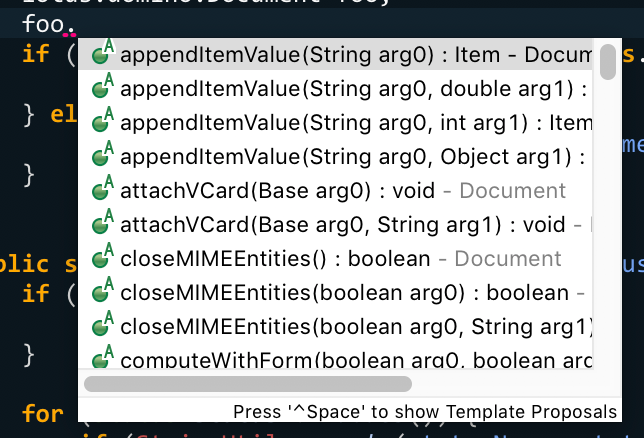
For some reason, the lotus.domino classes ship without Javadoc or even variable-name information, leading to this trainwreck:

Designer has its built-in help, which is also on the web, but that's quite a few steps down. This is table stakes for a Java API and always has been.

Updated p2 Repository

Back in 2014, the XPages team uploaded a clean p2 repository of the XPages artifacts to OpenNTF, corresponding with the 9.0.1 release. This repository saves a ton of hassle when building Tycho-based projects or just setting up an Eclipse workspace. However, it's quite long the tooth, as there have been several Notes.jar additions not included in there, and, in FP10, a significant upgrade to the undergirding OSGi framework.

I ended up writing a script to generated an updated version, but I don't have the legal ability to publish the results anywhere for easy consumption, meaning it has to be done manually and configured for each build environment. It would be a great convenience if there was an official package (ideally including the Designer plugins as well) and, even better, hosted on OpenNTF so that we could reference it by URL as we do for Eclipse releases (and require users to accept a license first).

Mavenized Repository

The p2 repository is good for Tycho-based projects, but, especially when targetting Domino is only one part of a project, it can be much more convenient to use "normal" Maven projects with maven-bundle-plugin. However, those projects can't use p2 repositories as such. For Darwino's needs, I ended up writing a tool in the (available-for-free) Darwino Studio plugins to Maven-ize a Domino p2 repository, but that hits the same snag as above of requiring manual setup in each instance.

This is another case where my preference would be on the OpenNTF Maven repository (plus Javadoc Jars, naturally).

Extension Library Source

The latest Extension Library release on OpenNTF is from FP9, while the latest on GitHub is from the FP7 era. FP10 shipped with a newer version of indeterminate nature. It'd be good to have this on both of those sites and, like with Javadoc, have source bundles shipped with the product in a way that is picked up automatically by Designer and Eclipse.

Source Bundles for Third-Party Components

The source for the undergirding Equinox stack is available, but it would be best to have, as an adjunct to the updated p2 repositories, the source bundles for the actual versions used so that we don't have to cobble together a platform from Eclipse's repositories.

Open-Source the Rest of the Stack

Having XPages, the Expeditor husk, and the other miscellaneous doodads that make up the proprietary layer as open source with an Apache-compatible license would cover a lot of the above and also be of tremendous use for XPages and non-XPages apps alike that run on or with Domino. I have a hard time imagining that it would lead to a lot of community-driven improvement, but it may do some (I'd have a few words to share with the file-download control, for example), and even just as a static release would be a significant boon.

Domino Connectivity in Eclipse

An idea I've been toying with lately is to make an Eclipse plugin that allows you to add Domino servers to the "Servers" view and control them to some extent. The basics would be to start/stop/restart HTTP, but the stretch goals would be to open a console view, get a list of running modules, integrate with the existing "load bundles from PDE" support, and, ideally, an outright "Run on Server" command for OSGi bundles and NSFs. However, I have so much on my plate that I'm not sure that I'll get to this any time soon unless I get a real itch some weekend.

Longevity

Refreshed JVMs

Feature Pack 8 brought Java 8, a vital step forward. However, since then, Oracle moved to a faster release cycle for Java and the JRE is now at version 10. Domino uses IBM's JVM variant, J9, which they recently moved to the Eclipse foundation as OpenJ9, where it has... sort of been keeping up, I think?

In any event, this increased pace of change has meant that the Java 8 honeymoon is over, and Domino development again requires special consideration when using current tools. I have no idea how complex the integration between Domino's tasks and the underlying JVM is, but my ideal would be to have constant or near-constant parity.

Servlet API 4.x

After the JRE version, the most important foundational element of a Java web app is the servlet API release. The current version is 4.0.1, while Domino supports 2.5 (or 2.4, maybe?). The good news is that the Java/Jakarta EE world seems to be used to lagging versions here, and 2.5 is a minimum version for a lot of current tech in much the same way that Java 6 was until somewhat recently, but there has been quite a bit added in recent years.

Presumably, a reason for the lag is the implied requirements of newer versions, such as WebSockets and HTTP/2 support, that would require heavy modifications to the core Domino HTTP code. Honestly, the more practical route is almost definitely to just use a different JEE server paired with CrossWorlds, some Java wrapper for the GRPC stuff HCL has been talking about, or (best of all) a Darwino app replicating with Domino, but still. WebSphere Liberty is actually really nice, by the way.

Refreshed Equinox

Like with the underlying JVM, the Feature Pack 10 update to a Neon-based OSGi/Equinox framework was a critical shot in the arm for the platform, but it is now also two major versions behind. This is a little less critical, since Equinox brings a bit less to the table for our needs and Neon is "new enough" for now, particularly on the server side, but it'd still be proper to keep pace.

Odds and Ends

Non-OSGi JEE Support

The Equinox framework that Domino uses is quite capable, but there's no pretending that OSGi-targetted development has its share of headaches. Most Java apps just target plain-old .war files and don't impose any particular requirements on the build process. Java development is a much more pleasant experience when you can just toss in any Maven dependency and not have to think about building a target platform for Eclipse or jumping through bundle-resolution hoops. I really like OSGi in theory, but I can't pretend that non-OSGi development isn't much smoother.

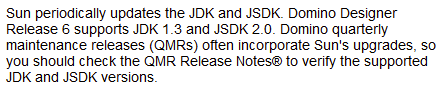
Domino technically supports "regular" servlets currently, but, uh, here's a snippet from the current documentation on that:

Hrm.

Full Extension Manager Support for Java

JAVADDIN/DOTS added a lot of EM hooks, but it doesn't cover the full suite of capabilities that a C addin can provide, such as authentication handling. Having this be fully accessible from Java would be useful even when treating Domino just as a data store and not as an app server.


I'm sure I could come up with more, but that's probably good for now. All easy, right?

NSF ODP Tooling 1.2

Tue Jun 12 19:45:00 EDT 2018

  1. Mar 05 2018 - Next Project: ODP Compiler
  2. Apr 28 2018 - NSF ODP Tooling 1.0
  3. Apr 29 2018 - NSF ODP Tooling Example Project
  4. Jun 12 2018 - NSF ODP Tooling 1.2
  5. Jun 30 2019 - How the ODP Compiler Works, Part 1
  6. Jul 01 2019 - How the ODP Compiler Works, Part 2
  7. Jul 02 2019 - How the ODP Compiler Works, Part 3
  8. Jul 03 2019 - How the ODP Compiler Works, Part 4
  9. Jul 05 2019 - How the ODP Compiler Works, Part 5
  10. Jul 07 2019 - How the ODP Compiler Works, Part 6
  11. Jul 08 2019 - How the ODP Compiler Works, Part 7

I've just published a new release of the NSF ODP Tooling, and this one is important by virtue of the fact that it covers enough bases for me to put it into production with my largest active XPages project.

Since the 1.0 release, I've added a couple important new Maven plugin options in addition to general bug fixes:

  • "compilerLevel": by default, it compiles to the Domino server's Java version (currently 1.8 in the minimum required configuration), but now it is possible to specify 1.6 to target older Domino releases for production
  • "appendTimestampToTitle": append a timestamp to the database title during compilation, which is useful to see when going to deploy the NTFs to production
  • "templateName": set a name to be used in the $TemplateBuild shared field, which is a nice bit of fit and finish when making a template. This also sets the version (based on the Maven project version) and build date fields
  • "setProductionXspOptions": to enable compressed JS and resource aggregation in the compiled NSF, useful to use the inefficient options for development/debugging but get better performance in deployment

I've also gradually improved the Eclipse side, though that can use a lot more work. Just having the in-NSF Java classpath working is a huge boon for development and refactoring, and it'd be great to eventually have tooling available to create and edit design elements with some proper knowledge of how they work, to keep the metadata in sync.

As it is, this project has been tremendously useful for me so far, easing a big burden - I can't tell you how much time I've lost switching branches between a release candidate and develop, trying to coax Designer into properly picking up the changed files and recompiling, and then prepping the NSFs for deployment (even with tools to aid me). With the ODPs wrapped in a Maven tree, I have Jenkins take care of all of that for me, and more reliably to boot.

Another Project: XPages Jakarta EE Support

Sun Jun 03 16:40:11 EDT 2018

In my dealings with JNoSQL recently, I’ve been delving more into the world of modern Jakarta EE/Java EE/J2EE development, particularly the magic land of CDI.

The JEE stack tends to be organized as a collection of specs and implementations, many of which are really independent of each other and the underlying platform, making them pretty portable onto any reasonably-recent JVM. Now that Domino is actually on a reasonably-recent JVM, that makes it a workable target! So I decided to create a side project to bring some of JEE to XPages.

XPages has always been “sort of Java EE” - you don’t really have the full stack, and it’s far behind on the components that it does have, but a lot of the concepts are there. Of particular interest are managed beans and expression language.

CDI and Managed Beans

The XPages stack contains what amounts to a priomordial version of CDI. Since the release of XPages, JSF improved on the original faces-config.xml declaration method to add annotation-based declarations, and then CDI is something of a codification and expansion of that into the full Java world.

My project uses the Weld reference implementation of CDI to create a CDI context for each XPages app that opts in, allowing it to use annotations on classes to declare beans and properties:

@ApplicationScoped
@Named // or @Named("applicationGuy")
public class ApplicationGuy {
    public void getFoo() {
        return "hello";
    }
}

These can then be used like normal managed beans in an XPage:

<xp:text value="#{applicationGuy.foo}"/>

The project’s README contains some further examples.

I went with the Java SE implementation of Weld instead of the pre-built servlet or OSGi packages since those are a little too smart for this use: they pick up on the fact that they’re in a JSF environment, but expect newer versions of the servlet spec and JSF.

Expression Language

Since its original release, EL went through a similar standardization process as CDI and is now at version 3.0 and is distinct from JSP and JSF. As anyone who has tried to call a method on a bean in EL has found out, the XPages EL implementation lags pretty far behind, at the JSF 1.0/1.1 level. Since that time, it sprouted parameters and “projection” and is essentially a tiny scripting language now.

My project uses GlassFish’s EL implementation to outright replace the stock EL interpreter for apps making use of it. I added some affordances to IBM’s customized data support, so it’s intended as a drop-in replacement:

<xp:text value="${dataObjectExample.calculateFoo('some arg')}"/>

<xp:text value="#{el:requestGuy.hello()}"/> 

Note the “el:” prefix in the runtime-bound expression: that’s to get around Designer’s validation of runtime EL expressions.

So… Why?

That’s a good question! The first two reasons are “because it’s fun” and “to learn more about JEE”, but there’s also practical value for this sort of thing.

XPages is moribund, and that leaves Domino developers with a few options:

  • Go back to LotusScript. The iPad Notes client makes this a terrifyingly-practical option, but it’s soul death.
  • Go to JavaScript (or another platform). This is another route HCL is pushing, and it’s entirely valid: Node is a great platform with excellent support and momentum.
  • Go to modern Java.

For anyone who has invested a lot of time and brainpower in XPages over the years, that last one particularly appealing, and projects like this can help you get there. If you have a large XPages code base, as I do with one of my clients, it makes a lot more sense to work on that in such a way that it gradually becomes less XPage-dependent while avoiding the trap of a full rewrite in another language.

Many of us have already done something of this sort: JAX-RS is another JEE standard, and the Wink implementation in the Extension Library, though also aging, accomplishes this same sort of task. Especially if your services don’t reference Wink explicitly and write just to the spec, they are very portable.

That portability - of code and skillset - is critical. Say you have a class like this:

import javax.inject.Inject;
import javax.ws.rs.Path;
import javax.ws.rs.GET;
import javax.ws.rs.core.MediaType;
import javax.ws.rs.core.Response;

@Path("/issues")
public class IssuesResource {
    @Inject IssueRepository issueRepository;

    @GET
    @Produces(MediaType.APPLICATION_JSON)
    public Response get(@QueryParam("category") String category) {
        return issueRepository.find(category).stream()
            .map(this::doSomething)
            .skip(3)
            .collect(this::toResponse);
        }

​     // ...
}

Which Java platform is that targetting? What’s the data storage mechanism? Who cares? This class certainly doesn’t. That could just as easily be Domino reading from an NSF or (as is actually the case in the example’s source) Tomcat with Darwino.

What’s Next?

Truthfully, maybe not much. Though JEE contains a whole raft of technologies, these two were the ones that scratch my immediate itch. We’ll see, though - the skill portability of erstwhile XPages developers is critically important, and I think that this is another one of the paths that can get us where we need to go.

NSF ODP Tooling Example Project

Sun Apr 29 12:51:36 EDT 2018

  1. Mar 05 2018 - Next Project: ODP Compiler
  2. Apr 28 2018 - NSF ODP Tooling 1.0
  3. Apr 29 2018 - NSF ODP Tooling Example Project
  4. Jun 12 2018 - NSF ODP Tooling 1.2
  5. Jun 30 2019 - How the ODP Compiler Works, Part 1
  6. Jul 01 2019 - How the ODP Compiler Works, Part 2
  7. Jul 02 2019 - How the ODP Compiler Works, Part 3
  8. Jul 03 2019 - How the ODP Compiler Works, Part 4
  9. Jul 05 2019 - How the ODP Compiler Works, Part 5
  10. Jul 07 2019 - How the ODP Compiler Works, Part 6
  11. Jul 08 2019 - How the ODP Compiler Works, Part 7

To go alongside the first proper release of my NSF ODP Tooling, I've added an example project to the Git repository:

https://github.com/OpenNTF/org.openntf.nsfodp/tree/master/example

This project demonstrates how to use the tooling to create an XPages library project and build an NSF that uses it within the same Maven tree. This example project also serves as a reasonable template for the standard kind of project setup I make for Domino nowadays, minus a compile-time test plugin (which I'll probably add in eventually).

Environment Setup

Before building the ODP, you'll need to set up a compilation server and configure Maven to know about it. To start out with, make sure you have a Notes-ified Maven environment as described here. Since the IBM-provided update site is quite old at this point, it may be worth updating it from your local installation.

Next, install the Domino plugins on a Domino server running at least 9.0.1 FP10. It's best to do this on a pristine server without non-standard plugins installed, since part of the compilation process is to load and unload the needed plugins for your project. For my needs, I set up a Linux VM and it's doing the job nicely. Once that's set up, configure your Maven settings.xml to reference your compiler server, merging these values in with the normal Notes properties:

<?xml version="1.0"?>
<settings xmlns="http://maven.apache.org/SETTINGS/1.0.0"
    xmlns:xsi="http://www.w3.org/2001/XMLSchema-instance"
    xsi:schemaLocation="http://maven.apache.org/SETTINGS/1.0.0 http://maven.apache.org/xsd/settings-1.0.0.xsd">
    <profiles>
        <profile>
            <id>main</id>
            <properties>
                <notes-platform>file:///Users/jesse/Documents/Java/IBM/Notes9.0.1fp10</notes-platform>
                <nsfodp.compiler.server>someserver</nsfodp.compiler.server>
                <nsfodp.compiler.serverUrl>http://some.server/</nsfodp.compiler.serverUrl>
            </properties>
        </profile>
    </profiles>
    <activeProfiles>
        <activeProfile>main</activeProfile>
    </activeProfiles>
    <servers>
        <server>
            <id>someserver</id>
            <username>builduser</username>
            <password>buildpassword</password>
        </server>
    </servers>
</settings>

Note the "server" block at the bottom to provide login credentials. The plugins require a non-anymous user - at the moment, they allow ANY non-anonymous user, though, so you can create a new user just for compilation purposes. It's also good practice to encrypt your server connection passwords.

There are also options for deploying the NSF, but, since that's less important for our needs, I'll leave that aside for now. The README has a bit more information about that.

The Example Project

The structure of the projects is similar to the one I detailed in my Java series a couple of years back, but it's evolved a bit since then. The main aspects of it of note are:

The Folder Structure

Lately, I've been following the advice from the Vogella blog about how to structure an OSGi project. In a case like this, where there is only one plugin, one feature, and one update site, it's overkill, but I've found it to be better to create this structure at the start so you don't end up with a big mess of projects serving different needs within the same flat folder.

The nsfodp-maven-plugin

The most pertinent addition is the ODP wrapped in a Maven project. In the nsfs/nsf-example folder, I created a pom.xml to configure a project of type domino-nsf, which expects by default the ODP to be in an odp folder immediately within it. The ODP in there is entirely normal: it's just a near-fresh NSF exported from Designer, with the main addition being the inclusion of the XPages Library.

The project's pom does a few things: it establishes it as being a domino-nsf project and it adds some additional configuration to the nsfodp-maven-plugin, telling it to include the update site generated earlier in the build as part of the compilation process; this is what allows the NSF to build with the XPages library in the current project.

License Management

Since I've been making contributions for OpenNTF and particularly since taking over as IP manager, I've developed a much better appreciation for dotting my is and crossing my ts when it comes to licensing. One of the tools I quite like for this is the license-maven-plugin from com.mycila (it's not the only one of that name, and any of them should do the job). This plugin allows you to specify a license header template to be added to the top of each of your source files, which is an otherwise-tedious task that's easy to neglect. Once I added that to the root pom and set up appropriate exclusions (definitely make sure to add exclusions for any third-party code!), I'm able to run mvn license:format from the root project and have it run through all the source files in the directory tree and add an appropriately-formatted license header. I've definitely made this a standard part of my project setup now.

Plugin Versioning and maven-enforcer-plugin

This one admittedly doesn't have that much impact on day-to-day development, but it's another good "keeping your ducks in a row" addition: I've taken to explicitly specifying the versions for my Maven plugins, even when the version is implied by the core Maven version. This "locking down" can reduce one cause of mysterious code breaking if an implicit inclusion is upgraded in a way that is incompatible with your build process.

My friend in this task is the versions-maven-plugin's versions:display-plugin-updates goal, which will look through your project tree and find plugins that have newer versions in the available repositories and also tell you what your implied plugin versions are from the super-pom. I use this information to explicitly enumerate the plugins and find updates - the "copy and paste this block of XML" nature of Maven means that it's very easy to end up running a plugin that's several major versions behind.

Alongside this, the goal will tell you what the minimum required Maven version is for everything you're doing, which I've taken to specifying in the old-style prerequisites block as well as via the newer-style maven-enforcer-plugin route. Laying out these requirements explicitly is another good way to avoid phantom problems. Note that, for Eclipse, it's good to add a m2e configuration block to ignore the enforcer line, since m2e doesn't know what to do with it.

The OpenNTF Artifactory Server

This isn't so much a new technique as it is a prerequisite for using the plugin: currently, the plugin is hosted on OpenNTF's Artifactory server and not Maven Central, so you'll have to add a pluginRepository block for it. Once you have that, you can add the nsfodp-maven-plugin to the root pom.

The Eclipse Tooling

Once you have a project configured in Maven, the next step is to install the Eclipse tooling. This can be installed into any Eclipse installation running Neon or newer in a Java 8+ JVM. For my use nowadays, I primarily use Oxygen.3a on the Mac, but any platform should work.

Once you have that installed, you can import the projects into your Eclipse workspace and the tooling will adapt some elements for use as a pseudo plugin project. It will auto-generate MANIFEST.MF and build.properties files at the project's top level (which is why it's important to have the ODP in a sub-directory, so the FP10+ MANIFEST.MF isn't overwritten) and use those to configure the XPages Java class path, requiring the same plugins as the NSF does, including XPages library plugins, as well as adding any used Jars to the classpath. The result is that you can use it to edit your Java code with full classpath knowledge:
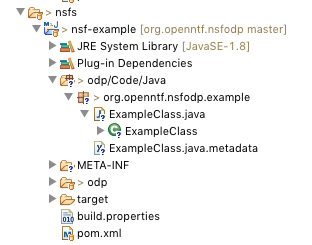
Eclipse Project

Beyond that, it provides some autocomplete capabilities for editing .xsp files. Currently, it had built-in knowledge of the controls that come standard on a Domoino 9.0.1FP10 server, plus any custom controls in your application. This autocomplete takes the form of contributions to Eclipse's standard XML editor, so it's pretty snappy:
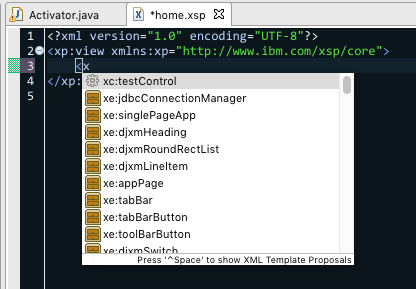
Autocomplete

This works for tag names as well as component properties.

Limitations

This tooling has some significant limitations:

  • The biggest is that it doesn't have any special knowledge of most design elements - and, if you use binary DXL for safety purposes, that means that most legacy elements are difficult to modify.
  • It doesn't currently do any programmatic pairing between editable design elements and their associated .metadata and .xsp-config files, so it's best to do keep Designer around for creating those.
  • The XSP autocomplete consists just of contributions to the autocomplete list, and so it doesn't do any checking for legality of content or tag placement, nor does it currently have any descriptive metadata.

Future Prospects

I've gotten this project to a point where I can reduce my level of daily annoyance with my tools, which is an important step. There are a few more things that I'd like to add so I can further reduce my need to use Designer at all: giving the editors some knowledge of split files could allow for manipulating custom control properties in a better way, some property panes may be worth making, I'd like to have a way to modify binary-format DXL notes (which may either be by using ODA's CD structure implementation or by round-tripping the DXL to Domino to convert it to friendly format for editing), and I'd like to eliminate the strict requirement of having a Domino server around for compilation.

The last one is a fun project on its own: my plan is to have a headless Java app loading up an Equinox environment and using the same plugins and REST services as the Domino server. That's mostly functional now, but it has some odd compilation-time bugs that will take some investigation. With that in place, it'd remove the need for any separate server, though it would then require that your development environment have a Notes or Domino runtime available.

As always, I'd welcome any contributions, especially if someone has a particular itch they'd like to scratch. I have some open issues in the GitHub project that I likely want to tackle at some point, and I'm sure this could cover a lot more ground besides.
NSF ODP Tooling 1.0

Sat Apr 28 17:37:42 EDT 2018

  1. Mar 05 2018 - Next Project: ODP Compiler
  2. Apr 28 2018 - NSF ODP Tooling 1.0
  3. Apr 29 2018 - NSF ODP Tooling Example Project
  4. Jun 12 2018 - NSF ODP Tooling 1.2
  5. Jun 30 2019 - How the ODP Compiler Works, Part 1
  6. Jul 01 2019 - How the ODP Compiler Works, Part 2
  7. Jul 02 2019 - How the ODP Compiler Works, Part 3
  8. Jul 03 2019 - How the ODP Compiler Works, Part 4
  9. Jul 05 2019 - How the ODP Compiler Works, Part 5
  10. Jul 07 2019 - How the ODP Compiler Works, Part 6
  11. Jul 08 2019 - How the ODP Compiler Works, Part 7

A couple weeks back, I started a new project, and today I decided to declare it a 1.0. The premise of this project is simple: I really, really hate Designer. Since the original post, it's expanded into a set of tools that cover three main tasks:

ODP Compilation

The main impetus of the whole thing was to get a way to compile On-Disk Projects into working NSFs without using the extremely-fiddly Headless Designer route (and thus also decoupling the build process from Windows). In 1.0, ODP compilation works by installing a set of plugins on a Domino server (Windows or Linux), configuring some Maven properties, and wrapping the ODP in a Maven project. That process can upload dependent OSGi plugins and compile complex XPages apps as well as import the expected normal legacy Notes resources.

NSF Deployment

In addition to compilation, the Maven wrapper can be configured to deploy the NSF to a Domino server also running the plugins. This portion isn't as battle-hardened as compilation, but it seems to work, as long as your server ID is authorized to run the resultant XPages application, since that's how it'll be signed. Perhaps in the future I'll add the ability to sign with an ID out of an ID Vault.

Eclipse Tooling

In Eclipse Neon or above, the tooling adds a bit of knowledge about how to handle ODP Maven projects as well as some autocomplete capabilities for editing XSP source. Currently, autocomplete knows about the components that come with Domino 9.0.1 FP 10 as well as any Custom Controls inside the NSF, but in time I'd also like to include XPages-Library-contributed components. Additionally, it configures the project as a Plug-in Project with dependencies based on the selected XPages libraries and with source folders and embedded jars set up in the classpath.

The End Result

This project started out as just wanting to get Jenkins compilation working more reliably, but it's grown a bit to also allow for a smoother developer experience when working with NSF data in Eclipse. The "use case", for lack of a better term, that I'm aiming for is when you have the bulk of your code in OSGi plugins but have an NSF to maintain. I don't have any interest in replacing every editor from Designer, but I'd like to have enough that it's practical to do some basic XPages and legacy dev work without having to go over to Designer for everything. It's not fully there yet, but this version is a good start.

Getting The Code

The project is hosted on OpenNTF, and the source code is hosted on GitHub.

Compiling and Testing XPages Plugins With Java 9+

Fri Apr 13 15:38:50 EDT 2018

Tags: java xpages

Thanks to 9.0.1 FP8, we've been able to use Java 8 on Domino for a while, and FP10 makes that support a bit more official at the OSGi level. However, Java 8 is no longer the latest Java runtime, and so anyone writing XPages plugins and compiling/testing them via Maven will likely run into a situation where the compiling JRE is 9 or above. There are a couple changes in these runtimes that add some wrinkles to the process, so I took up the task of working around the problems I hit, and I created a Git repository to contain the code and tips I used to do so:

https://github.com/OpenNTF/org.openntf.domino.java9compat

The README in the repo contains a couple bits of Maven configuration that can be used to successfully compile XPages plugins in Java 9 or 10, and the included project contains a patch fragment for the com.ibm.notes.java.api plugin that serves up the Notes.jar to work around the fact that CORBA has been removed from the standard JRE.

For my needs, those changes made me able to compile a reasonably-complex XPages application, but there may be other edge cases I haven't hit yet. As I do, I'll add information and code there.

Next Project: ODP Compiler

Mon Mar 05 17:32:06 EST 2018

Tags: xpages java
  1. Mar 05 2018 - Next Project: ODP Compiler
  2. Apr 28 2018 - NSF ODP Tooling 1.0
  3. Apr 29 2018 - NSF ODP Tooling Example Project
  4. Jun 12 2018 - NSF ODP Tooling 1.2
  5. Jun 30 2019 - How the ODP Compiler Works, Part 1
  6. Jul 01 2019 - How the ODP Compiler Works, Part 2
  7. Jul 02 2019 - How the ODP Compiler Works, Part 3
  8. Jul 03 2019 - How the ODP Compiler Works, Part 4
  9. Jul 05 2019 - How the ODP Compiler Works, Part 5
  10. Jul 07 2019 - How the ODP Compiler Works, Part 6
  11. Jul 08 2019 - How the ODP Compiler Works, Part 7

One of the larger thorns in my side with my Domino development lately has been trying to automate builds of on-disk projects into NSFs via Jenkins. In theory, the process is pretty straightforward. It even works sometimes! However, particularly once you add in the necessity to deploy OSGi plugins to Designer first and want to run it from Jenkins, things get extraordinarily flaky: Designer may not launch properly from a behind-the-scenes Jenkins runner, the plugin installation may mysteriously fail, and so forth - and the error reporting is difficult at best.

So it's been on my mind for a good while to find a way to get from an ODP to an NSF without involving Designer, and I decided over the last couple days to really take a swing at it. It's not a small task, though; the process involves a number of difficult steps:

  • Install and activate provided OSGi plugins
  • Create an XPages registry that knows about the XPages libraries installed on the server, including those just contributed
  • Translate XPages and Custom Controls into Java source, with intra-file knowledge of the just-added CCs
  • Create a Java classpath that matches the plug-in dependencies that Designer derives from the dependant XPages Libraries
  • Compile the resultant Java source and any Java classes in the NSF into bytecode
  • Recompose the composite data form of the file data for these elements and many file resources into their DXL ".metadata" files for import
  • Create an NSF and import all of this
  • Compile any LotusScript in source-based libraries from the ODP
  • Uninstall any hot-loaded OSGi plugins

Those steps even leave out some fiddly details, like components defined via .xsp-config files in the NSF or XSP-associated .properties files, not to mention any steps I haven't encountered yet. It's a lot of work!

My first hope was to be able to hook into the process that Designer uses, perhaps grabbing a couple pertinent OSGi plugins and going from there. However, from what I can tell, all the involved plugins are intricately tied into many layers of Designer-the-IDE and so are no small matter to use on their own without also including the entire stack. So that left me to cobble together an equivalent process out of parts.

Fortunately, a couple projects have already provided a solid foundation for this. First and foremost is the XPages Bazaar. This is a project that Philippe Riand created a number of years ago, meant to be a workshop for really experimental components in a form less contrained than the ExtLib became. Since he left IBM, it's sat unmaintained, but I figured it'd be a perfect incubator for this project, so I tossed it up on GitHub, recomposed its Maven structure, and cleaned it up a bit for FP10 use. The reason why it makes such a perfect shell is a pair of its features: an XSP interpreter and an on-the-fly Java compiler. The former hooks into the mysterious guts of the XSP runtime to allow for translation of XSP to Java and the latter wraps the official Java compiler API with some OSGi knowledge to compile that along into bytecode.

Even starting with this, the first couple steps still required a lot of digging around. I learned how to install and activate OSGi bundles, how XPages Registries work internally, and made some tweaks to work around problems I encountered. I also encountered the joy of a bizarre javac bug to do with annotations in enum constructors, which my target project used.

Once I had the XPages-side components compiled, the next step was to start composing the NSF. The ODP format for XPages elements and other "file resource"-type entities is to put the code in its "normal" form in a file and then a subset of the DXL in a ".metadata" file next to it. The trouble here is that, even for entities where the file data is stored in the note unprocessed, the storage format isn't a strict binary blob of the file data: it's a composite data stream of file header and segment structures. I thought of two main ways I could go about getting these file resources into the NSF: via IBM's NAPI and by building the structures into the DXL files before import. The NAPI has a convenient FileAccess class for this purpose (presumably used by Designer), but my attempts to use it met primarily with server crashes. I'm sure it's possible to go this route, but I'd already "solved" the DXL problem years ago, for ODA's Design API. So, at least for now, I took the tack of writing out the binary structure manually, pouring it into the DXL as Base64, and importing that. It's a little inefficient, but it works.

Overall, I've made a lot of progress so far, but there's still a lot to be done: not all file types have their data put into the right places, LotusScript isn't properly compiled, Agents don't do anything at all yet, and XPages+CCs aren't actually imported into the NSF. Still, it's in a spot where I'm confident that it can one day work, whichis more than I could have said a week ago. If you'd like, browse around the code and pitch in if it's an itch you'd like to scratch as well.