Seriously, Though: Reverse Proxies

Wed Sep 16 17:28:38 EDT 2015

So, Domino administrators: what are your feelings about SSL lately? Do they include, perhaps, stress? It's "oh crap, my servers are broken" season again, and this time the culprit is a change in Apple's operating systems. Fortunately, in this case, the problem isn't as severe as an outright security vulnerability like POODLE and, better still, there is a definitive statement from IBM indicating that they are going to bring their security stack up to snuff almost in time.

But this isn't the first time we've been in this position, nor will it be the last. The focus on cracking and hardening TLS, particularly in the context of HTTPS, is not going to let up any time soon, nor will the basic movement towards encryption everywhere. So I would like to reiterate my stance: Domino is not suitable for direct external exposure via HTTP. The other protocols are problematic as well, but HTTP is the big one and, fortunately, the easiest to solve.

Whenever I've made this exhortation, part of the response I get is that administrators "should not" have to take this step. That Domino should be fully modern in its security stack or, at least, that IBM should handle this problem for them in one way or another. Or that one of Domino's traditional strengths is its all-on-one nature, with a single easy installation that takes care of everything, and that installing a separate web server is a complicated step that administrators shouldn't have to take.

Well... tough.

The promise of an integrated server system that took care of everything is a great promise, but it's always been extremely difficult to achieve, even for a platform firing on all cylinders. No matter the ideal, Domino does not perform at this level, and I still maintain that it should not need to. Outside of Domino and PHP, the application server is not generally expected to also be a full-fledged front-end web server, for exactly this sort of reason. Domino's job with respect to the web is to generate and serve up HTML, JSON, and other content; it's something else's job to make sure that that leaves your company's network securely.

If you still maintain that this should be Domino's job due to how much you pay for licensing, then that's a conversation between you and your IBM sales rep. I, though, am entirely fine with a paid-for app server not covering this ground, and that's in large part because the products that do perform this task are superb and often open-source.

These other products – nginx, Apache, HAProxy, and so forth – are made for this job. This flurry of SSL/TLS features and bugs you've been hearing about? These are all implemented or fixed in dedicated products, sometimes years before they come to your attention. And when new problems crop up, they're fixed and talked about immediately across the web, with guides for what to do appearing as soon as the problem arises.

Is it easier to continue using Domino HTTP directly than to set up a reverse proxy? Sure! Well, sort of, when there's not an active disaster to mitigate. And, much like how keeping an XPages (or other web) app up to spec and working on all target devices is more complicated than a legacy Notes app, sometimes that's just how the world goes. Deciding that it's complexity you don't want, or that your company's policy doesn't allow for an additional server, is not a tenable stance. Unless you're Apple, your company's policy will not bend the arc of the industry.

So, I implore you, at least give this kind of setup a real look and a trial run. I think you'll find that the basic setup is not dramatically more complicated than just Domino alone and will also open the door to new non-security features like improving page load speeds on the fly. If you want, with eyes open, to maintain an externally-facing Domino HTTP stack, that's fine, but I'll see you when the next security apocalypse comes around.

XPages Devs: Enable "Refresh entire application when design changes"

Mon Sep 14 11:48:46 EDT 2015

Tags: xpages java

When developing an XPages application of beyond-minimal complexity, you're likely to run into a problem where your app starts saying that a class is incompatible with itself in one way or another. The exception usually traces down to something like "foo.SomeClass is incompatible with foo.SomeClass" or "cannot assign instance of foo.SomeClass to field X..." where the field is that same class. This has cropped up since time immemorial.

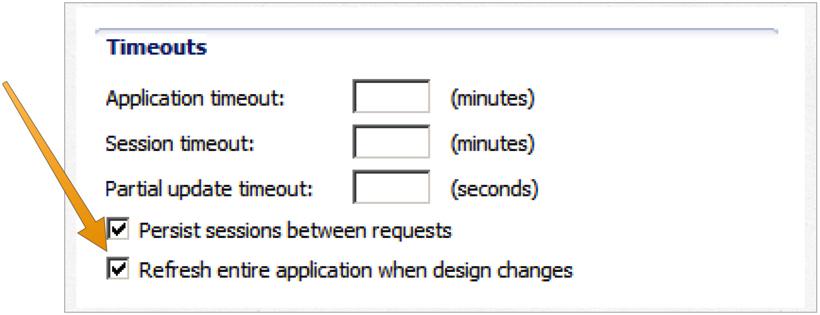
It's actually, though, something that IBM sort-of fixed in 8.5.3 by adding an xsp.properties option of xsp.application.forcefullrefresh=true and then, in 9.0, a GUI option in Xsp Properties:

Basically, this checkbox amounts to "don't break my app periodically". From what I gather, the default behavior is in the interest of being clever with classloaders, but can lead to creeping problems in complicated apps, to the point where changing seemingly-innocuous things like the ACL breaks the app until you restart HTTP or "kick" the app by modifying certain design elements (namely, Java classes or faces-config.xml). Since that behavior is never desired, there is no reason to not check this box, and I enable it on every new NSF I create.

Dealing with OSGi Fragments in Tycho and Designer

Fri Sep 11 19:30:20 EDT 2015

Tags: java tycho osgi

This post is partly to spread information publicly and partly a useful note to my future self for the next time I run into this trouble.

In OGSi, the primary type of entity you're dealing with is a "Bundle" or "Plug-in" (the two terms are effectively the same for our needs). However, there's a sort of specialized type that you may run into called a "Fragment". They're similar to a plug-in in that they're a contained unit of Java code and resources, but they have the special property that they're attached to another plug-in and automatically come along for the ride when the main plug-in is used. This is useful in a couple situations, such as code organization, serving platform-specialized native libraries, after-the-fact additions, or providing library dependencies.

In the basic case, the only requirement is to specify in the fragment what the "parent" plug-in is (Eclipse provides a field for this in its editor) and then including the fragment in the installable feature alongside the plug-in. However, there are a few situations where a bit more work is required if you want to access the classes in the fragment: when used as part of a Tycho build and when used as an XSP Library in Designer (which may also apply to Eclipse dependency use generally).

Tycho

When doing a full Tycho build, even if both the plug-in and its fragment(s) are part of the current build, another project won't automatically include the fragment when doing the compilation. This can lead to a situation where the projects will compile cleanly in Eclipse (which handles the fragment attachment) but fail in Tycho. The trick, though small, is non-obvious: you have to tell the project that is using the fragment code about the fragment in its build.properties.

So say you have three projects: the main plug-in (some.main.plugin), a fragment attached to it (some.main.plugin.fragment), and the project consuming them (some.dependent.plugin). The normal first step is to include the main plug-in in the dependent plug-in's MANIFEST.MF as usual:

Require-Bundle: some.main.plugin

In Eclipse, this will suffice: both the main plug-in and its fragment will show up in the "Plug-in Dependencies" library. For Tycho, though, you have to tip it off using a line like this in build.properties:

extra.. = platform:/fragment/some.main.plugin.fragment

Think of this as saying "hey, dummy, don't forget about the fragment". Once you have that line, the Tycho-enabled Maven build should be able to resolve the fragment's classes and all will be well.

Designer

When using the plug-in and its fragment in an XSP Library in Designer, there's a similar-seeming problem: though Designer will include any direct dependencies of your Library plug-in in the class path, it won't pick up on any fragments by default (though it seems that Domino does). The trick here is that the primary plug-in has to tell Designer that it accepts fragments, which is done by setting Eclipse-ExtensibleAPI in the MANIFEST.MF file for some.main.plugin, like so:

Eclipse-ExtensibleAPI: true

Once that's in place, the fragment should start showing up in your NSF's classpath when the library is enabled.

My MWLUG 2015 Presentation, "Maven: An Exhortation and Apology"

Sun Aug 30 19:07:11 EDT 2015

Tags: mwlug

As prophesied, I gave a presentation on MWLUG last week. Keeping with my tradition, the slides from the deck are not particularly useful on their own, so I'm not going to post them as such. However, Dave Navarre once again did the yeoman's work of recording my session, so it and a number of other sessions from the conference are available on YouTube.

In addition, my plan is to expand, as I did earlier today, on the core components of my session in blog form, in a way that wouldn't have made much sense in a conference session anyway. And, if I'm as good as my word, I'll make a NotesIn9 episode or two on the subject.

Wrangling Tycho and Target Platforms

Sun Aug 30 17:16:13 EDT 2015

Tags: maven tycho

One of the persistent problems when dealing with OSGi projects with Maven is the interaction between Maven, Tycho, and Eclipse. The core trouble comes in with the differing ways that Maven and OSGi handle dependencies.

Dependency Mechanisms

The Maven way of establishing dependencies is to list them in your Maven project's POM file. A standard one will look something like this:

<dependencies>
	<dependency>
		<groupId>com.google.guava</groupId>
		<artifactId>guava</artifactId>
		<version>18.0</version>
	</dependency>
</dependencies>

This tells Maven that your project depends on Guava version 18.0. The "groupId" and "artifactId" bits are essentially arbitrary strings that identify the piece of code, and, following Java standards, convention dictates that they are generally reverse-DNS-style. There are variations on this setup, such as specifying version ranges or sub-artifacts, but that's what you'll usually see. The term "artifact" is a Maven-ism referring to a specific entity, usually a single Jar file, and I've taken to using it casually.

One of the key things Maven brings to the table here is Maven Central: a warehouse of common Maven-ized projects. Without specifying any additional configuration, the dependency declaration above will cause Maven to check with Maven Central to find the Jar, download it, and store it in your local repository (usually ~/.m2/repository). Then, during the build process, Java can reference the local copy of the Jar in the consistently-organized local folder structure. It will also, if needed, download "transitive" dependencies: the dependencies listed by the project you're depending on.

OSGi's dependency system is conceptually similar. Instead of the POM file, it piggybacks on the Jar's MANIFEST.MF file with something like this:

Require-Bundle: com.google.guava;bundle-version="18.0"

This is essentially the same idea as the Maven dependency: you reference an OSGi-enabled Jar (called a "Bundle" in OSGi parlance... which can also be a "Plug-in") by its usually-reverse-DNS name and provide restrictions on versions, plus other potential options.

There is no equivalent here of Maven Central: OSGi artifacts are found in Update Sites for each project and are added to the OSGi environment. When you install a plug-in in Eclipse/Designer or Domino, you are contributing to your installation's pool of OSGi artifacts. There are some conveniences to make this experience easier in some cases, such as the Eclipse Marketplace and the primary Eclipse Update Site, but it's not as coordinated as Maven.

The Overlap

Though often redundant, these two dependency mechanisms are not inherently incompatible. A given Jar file can be represented as both a Maven artifact and an OSGi bundle - and, indeed, a great many of the artifacts in Maven Central come pre-packaged with OSGi metadata, and there are Maven plugins to make generating this invisible to the developer.

Tycho - the Maven plugin that creates an OSGi environment for your Maven development - has the capability to more-or-less bridge this gap. By adding the Tycho plugins to your Maven build, you can point Maven at OSGi Update Sites (called "p2" sites) and Tycho will be able to find the artifacts referenced by your project's MANIFEST.MF Require-Bundle line. Even better, by using <pomDependencies>consider</pomDependencies> in your Tycho config, it will be able to look at the Maven dependencies of your project, check them for OSGi metadata, and then use that to satisfy the MANIFEST.MF requiremenets.

Though convoluted to say, the upshot is that, when you have that pomDependencies option, things work out pretty well... from the command line. The trouble comes in when you want to develop these projects in Eclipse.

Target Platforms

The aggregate set of OSGi bundles known by your OSGi environment (either Tycho or Eclipse in this case) and used for compilation is the "Target Platform". If you've used the XPages SDK or otherwise set up a non-Designer Eclipse installation for XPages plug-in development, you've seen Target Platforms in action: the installation process locates your Notes and Domino installations and adds their OSGi bundles to Eclipse's Target Platform, allowing them to be references by your own OSGi projects.

The trouble is that Eclipse is a bit... inflexible when it comes to specifying a project's Target Platform. Though Eclipse has the capacity to have many Target Platform definitions, only one is active at a time for your entire workspace. Moreover, this Target Platform (plus any projects in your workspace) makes up the entirety of what Eclipse is willing to acknowledge for OSGi development.

This causes serious trouble for Maven dependencies.

If you have a Tycho-enabled project, Eclipse's adapter will not use its Maven dependencies for OSGi requirement resolution. So if your project lists Guava in both OSGi and Maven, even though Maven can see it, and Tycho can see it, and the Guava Jar sitting in your local Maven repository is brimming with OSGi metadata, Eclipse will not acknowledge it and you will have an error that com.google.guava can't be found.

Workarounds

There are a couple potential workarounds for this, none of which are particularly great.

Just Do It Manually

One option is to just have any developers working on the project also track down and manually add all applicable OSGi bundles to their Eclipse installation. It's not ideal, but it could work in a pinch, especially if you only have a single dependency or two.

Include the Project Wholesale

This is the approach the OpenNTF Domino API has taken to date: several of its external dependencies are included wholesale in source form in the project tree. This accomplishes the goal because, with the projects in your workspace, Eclipse will happily acknowledge them as part of the Target Platform, while Tycho will also be able to recognize them. However, it carries with it the significant down side of importing a whole heap of foreign code into your project and then having to ensure that it builds in your environment.

Maven-Generated Target Platform

Another option is to have Maven create a Target Platform file (*.target) dynamically, and then have Eclipse use that as its Target Platform definition. You can do that by including a Maven project like this in your tree:

<?xml version="1.0"?>
<project
	xsi:schemaLocation="http://maven.apache.org/POM/4.0.0 http://maven.apache.org/xsd/maven-4.0.0.xsd"
	xmlns="http://maven.apache.org/POM/4.0.0" xmlns:xsi="http://www.w3.org/2001/XMLSchema-instance">
	<modelVersion>4.0.0</modelVersion>
	<parent>
		<groupId>com.example</groupId>
		<artifactId>project-parent</artifactId>
		<version>1.0.0-SNAPSHOT</version>
	</parent>
	<artifactId>example-osgi-target</artifactId>
	
	<packaging>eclipse-target-definition</packaging>
	
	<build>
		<plugins>
			<plugin>
				<groupId>lt.velykis.maven</groupId>
				<artifactId>pde-target-maven-plugin</artifactId>
				<version>1.0.0</version>
				<executions>
					<execution>
						<id>pde-target</id>
						<goals>
							<goal>add-pom-dependencies</goal>
						</goals>
						<configuration>
							<baseDefinition>${project.basedir}/osgi-base.target</baseDefinition>
							<outputFile>${project.basedir}/${project.artifactId}.target</outputFile>
						</configuration>
					</execution>
				</executions>
			</plugin>
		</plugins>
	</build>
</project>

By creating a shell Target file in Eclipse named osgi-base.target, this project will locate its known dependencies (namely, any dependencies listed in it or in parent projects) and glom the paths of any of those OSGi plugins found in your local Maven repository onto it. In Eclipse, you can then open the generated Target file and set it as your active.

This... basically works, but it's ugly. Moreover, it limits your Target Platform customization options. If you want to include other Update Sites in your platform (say, the XPages targets generated by the SDK), you would have to modify the base Target file manually, making it fragile for multi-developer use.

Maven-Generated p2 Site

This is the option I'm tinkering with now, and it's similar to the Target-file approach. However, instead of creating an exclusive Target Platform, you can have Maven create a p2 Update Site and then add that directory to your Target Platform manually. That manual step is still unfortunate, but it's not too bad, and it should adapt automatically as more dependencies are added. A Maven plugin named p2-maven-plugin can do a tremendous amount of heavy lifting here: it can track down Maven dependencies, add OSGi metadata if they don't have them already, do the same for their dependencies, and then put them all into a nicely-organized Update Site:

<project xmlns="http://maven.apache.org/POM/4.0.0" xmlns:xsi="http://www.w3.org/2001/XMLSchema-instance"
	xsi:schemaLocation="http://maven.apache.org/POM/4.0.0 http://maven.apache.org/xsd/maven-4.0.0.xsd">
	<modelVersion>4.0.0</modelVersion>

	<groupId>com.example</groupId>
	<artifactId>example-osgi-site</artifactId>
	<version>1.0.0-SNAPSHOT</version>
	<packaging>pom</packaging>

	<pluginRepositories>
		<pluginRepository>
			<id>reficio</id>
			<url>http://repo.reficio.org/maven/</url>
		</pluginRepository>
	</pluginRepositories>

	<build>
		<plugins>
			<plugin>
				<groupId>org.reficio</groupId>
				<artifactId>p2-maven-plugin</artifactId>
				<version>1.2.0-SNAPSHOT</version>
				<executions>
					<execution>
						<id>default-cli</id>
						<phase>validate</phase>
						<goals>
							<goal>site</goal>
						</goals>
						<configuration>
							<artifacts>
								<artifact><id>com.google.guava:guava:18.0</id></artifact>
							</artifacts>
						</configuration>
					</execution>
				</executions>
			</plugin>
		</plugins>
	</build>
</project>

Once this project is executed, you can then add the generated folder to Eclipse's active Target Platform and be set. Though I haven't put this into practice yet, it may be the best out of a bad bunch of options.

Don't Use Eclipse

Well, I guess this final option may be the best if you're not an Eclipse fan - other IDEs may handle this whole thing much more smoothly. So, if you use IntelliJ and it doesn't have this problem, that's good.


These problems cause a lot more heartburn than you'd think they should, considering that this is basic project setup and not even part of the task of actually developing your project, but such is life. As long as you have a dependency on non-Mavenized OSGi artifacts (such as the XPages runtime) or want to use Tycho's full abilities (such as OSGi-environment unit tests or building full Eclipse-based applications) while also developing in Eclipse, you're stuck with this sort of workaround.
MWLUG 2015 - Maven: An Exhortation and Apology

Sun Aug 16 11:55:17 EDT 2015

Tags: mwlug maven

At MWLUG this coming week, I'll be giving a presentation on Maven. Specifically, I plan to cover:

  • What Maven is
  • Why Domino developers should know about it
  • Why it's so painful and awkward for Domino developers
  • Why it's still worth using in spite of all the suffering
  • How this will help when working on projects outside of traditional Domino

The session is slated for 3:30 PM on Thursday. I expect it to be cathartic for me and useful for the attendees, so I hope you can make it.

Maven Native Chronicles, Part 3: Improving Native Artifact Handling

Sun Jul 26 21:38:37 EDT 2015

Tags: maven
  1. Jul 24 2015 - Maven Native Chronicles, Part 1: Figuring Out nar-maven-plugin
  2. Jul 26 2015 - Maven Native Chronicles, Part 2: Setting Up a Windows Jenkins Node
  3. Jul 26 2015 - Maven Native Chronicles, Part 3: Improving Native Artifact Handling
  4. Feb 27 2016 - Maven Native Chronicles: Running Automated Notes-based Tests

This post isn't so much a part of the current series as it is a followup to a post from the other week, but I can conceptually retcon that one in as a prologue. This will also be a good quick tip for dealing with Maven projects.

In my previous post, I described how I copied the built native shared library from the C++ project into the OSGi fragments for distribution, and I left it with the really hacky approach of copying the file using a project-relative path that reached up into the other project. It technically functioned, but it relied on the specific project structure, which wouldn't survive any reorganization or breaking up of the module tree.

To improve it, I reworked it to be a bit more Maven-y, which involves two steps: attaching the built artifacts to the output of the native project and then using the dependency plugin to copy the native artifacts in as needed. For the first step, I used the build-helper-maven-plugin, though there may be other ways to do it. This is relatively straightfoward, though:

<plugin>
	<groupId>org.codehaus.mojo</groupId>
	<artifactId>build-helper-maven-plugin</artifactId>
	<version>1.3</version>
	<executions>
		<execution>
			<id>attach-artifacts</id>
			<phase>package</phase>
			<goals>
				<goal>attach-artifact</goal>
			</goals>
			<configuration>
				<artifacts>
					<artifact>
						<file>${project.basedir}/x64/Debug/nativelib-win32-x64.dll</file>
						<type>dll</type>
						<classifier>win32-x64</classifier>
					</artifact>
					<artifact>
						<file>${project.basedir}/Win32/Debug/nativelib-win32-x86.dll</file>
						<type>dll</type>
						<classifier>win32-x86</classifier>
					</artifact>
				</artifacts>
			</configuration>
		</execution>
	</executions>
</plugin>

This causes the native libraries - so far, the two Windows ones - to be included in the Maven repository during installation, and to then be accessible from other projects. The files are named using the module base name plus the classifier appended and the type as the file extension, like native-project-name-win32-x64.dll.

To copy that artifact into the OSGi bundle project, I then use maven-dependency-plugin to copy it in. Here I reference it via the module name and the classifier/type pair used above (with some shorthands because they're in the same multi-module project):

<plugin>
	<groupId>org.apache.maven.plugins</groupId>
	<artifactId>maven-dependency-plugin</artifactId>
	<version>2.10</version>
	
	<executions>
		<execution>
			<id>copy-native-lib</id>
			<phase>prepare-package</phase>
			<goals>
				<goal>copy</goal>
			</goals>
			<configuration>
				<artifactItems>
					<artifactItem>
						<groupId>${project.groupId}</groupId>
						<artifactId>native-project-name</artifactId>
						<version>${project.version}</version>
						<type>dll</type>
						<classifier>win32-x64</classifier>
					</artifactItem>
				</artifactItems>
				<outputDirectory>lib</outputDirectory>
				<stripVersion>true</stripVersion>
			</configuration>
		</execution>
	</executions>
</plugin>

The net result here is the same as previously, but should be more maintainable.

Maven Native Chronicles, Part 2: Setting Up a Windows Jenkins Node

Sun Jul 26 11:16:50 EDT 2015

Tags: maven
  1. Jul 24 2015 - Maven Native Chronicles, Part 1: Figuring Out nar-maven-plugin
  2. Jul 26 2015 - Maven Native Chronicles, Part 2: Setting Up a Windows Jenkins Node
  3. Jul 26 2015 - Maven Native Chronicles, Part 3: Improving Native Artifact Handling
  4. Feb 27 2016 - Maven Native Chronicles: Running Automated Notes-based Tests

Before I get to the meat of this post, I want to point out that Ulrich Krause wrote a post on a similar topic today and you should read it.

The build process I've been working with involves a Jenkins server running on OS X (in order to build iOS binaries), and so it will be useful to have a Windows instance set up as well to run native builds and, importantly, tests. Jenkins comes with support for distributed builds and makes it relatively straightforward.

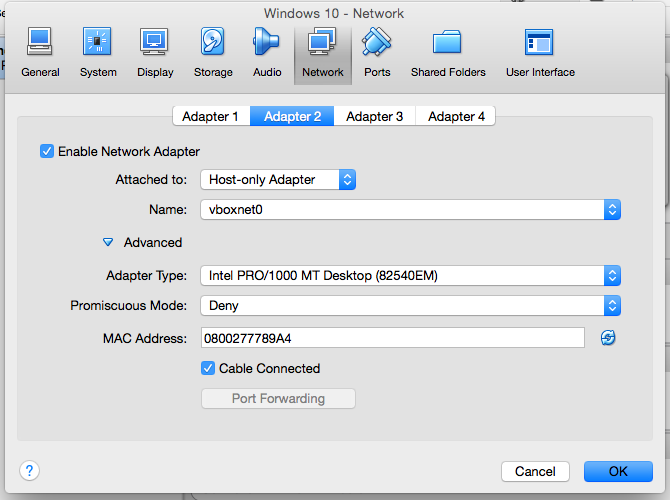
To start with, I installed VirtualBox and went through the usual Windows setup process - it shouldn't matter too much which major version of Windows you use, as long as it's 64-bit, in order to be able to generate and test both types of binaries. Once that was running, I installed the latest 64-bit JDK followed by Visual Studio Community, which is a pretty smooth process (for all their faults, Microsoft knows how to treat developers). To provide access to the VM from the Mac host, I added a second network adapter to the VM and set it to host-only networking:

During this process, I found Jump Desktop to be a very useful tool. Since the Mac host runs SSH, I was able to set up an RDP connection to the Windows VM using an SSH tunnel, which Jump does transparently for you. This made for a much better experiencing than VNCing into the Mac and controlling Windows in the VirtualBox window in there.

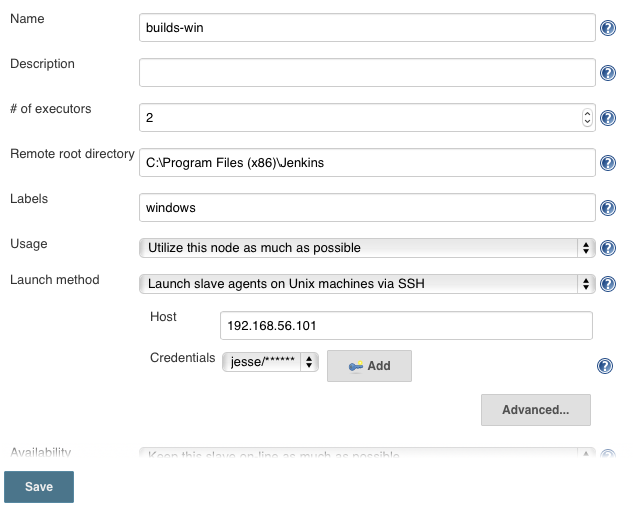
Next, I decided that the route I wanted to take to control the Windows slave was SSH, since SSH is the bee's knees. I installed Cygwin, which creates a fairly Unix-like environment on top of Windows, and included OpenSSH in the process. After going through the afore-linked setup process, I had SSH access to the Windows machine (including, thanks to SSH proxying, remote access via the primary build server). On the Jenkins side on the Mac, I installed the "Cygpath plugin" (which is in the built-in plugin manager) to avoid any of the issues mentioned on the wiki page. The configuration in Jenkins is relatively straightforward (I will probably end up changing the base directory to be a clean Jenkins home, since I hadn't initially been sure if I needed Jenkins installed on the slave):

With that, I was able to set the build to run on servers with the "windows" label, kick it off, and start going through its complaints until I had it working.

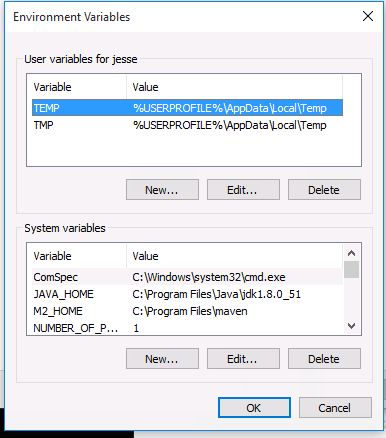
First off, I had some more Java setup to do, specifically creating a system environment variable named JAVA_HOME and setting it to the root of the JDK ("C:\Program Files\Java\jdk1.8.0_51" in this case). Then, I set up Maven, which is something of an awkward process on Windows, but not TOO bad. I downloaded the latest binaries, unzipped them to "C:\Program Files\maven", added an environment variable of M2_HOME to point to that:

I also added %M2_HOME%\bin;C:\Program Files (x86)\MSBuild\12.0\Bin to the end of the PATH variable, to cover both the Maven tools and the msbuild executable for later.

I ran into a bit of weirdness when it came to setting up configuration for SSH and Maven, specifically because it seems that Cygwin has two home folders for the logged-in user: the Unix-style /home/jesse and the normal Windows C:\Users\jesse (which is available in Cygwin as /cygdrive/c/Users/jesse). Since this Jenkins build checks out the code from GitHub via SSH, I needed to copy over the id_rsa file for the Jenkins user: this went into /home/jesse/.ssh/id_rsa. In order to configure Maven, though, the settings file went to C:\Users\jesse\.m2\settings.xml.

Eventually, it slogged its way through the build to completion, including a successful run of the integration tests. I still need to figure out the best way to get the resultant artifacts back out (or maybe it will be best to just deploy from both to the same Artifactory server), but this seems to do the main task for me.

Maven Native Chronicles, Part 1: Figuring Out nar-maven-plugin

Fri Jul 24 15:48:59 EDT 2015

  1. Jul 24 2015 - Maven Native Chronicles, Part 1: Figuring Out nar-maven-plugin
  2. Jul 26 2015 - Maven Native Chronicles, Part 2: Setting Up a Windows Jenkins Node
  3. Jul 26 2015 - Maven Native Chronicles, Part 3: Improving Native Artifact Handling
  4. Feb 27 2016 - Maven Native Chronicles: Running Automated Notes-based Tests

As I mentioned the other day, my work lately involves a native shared library that is then included in an OSGi plugin. To get it working during a Maven compile, I just farmed out the actual build process to Visual Studio's command-line project builder. That works as far as it goes, but it's not particularly Maven-y and, more importantly, it's Windows-only.

In looking around, it seems like the most popular method of doing native compilation in Maven, especially with JNI components, is maven-nar-plugin - nar means "Native ARchive", and it's meant to be a consistent way to package native artifacts (executables and libraries) across platforms. It does an admirable job wrangling the normally-loose nature of a C/C++ program to work with Maven-ish standards and attempts to paper over the differences between platforms and toolchains. I'm not entirely convinced that this will be the way I go long-term (in particular, its attitude towards multi-platform/arch builds seems to be "eh, sort of?"), but it's a good place to get started with non-Windows compilation.

The first step was to move the files around to mostly match a Maven-style layout. Starting out, the .cpp and .h files were in the src folder directly, while dependency headers were in a dependencies folder next to it. I left the Notes includes in there for now, but it seems that nar-maven-plugin will cover the JNI stuff for me, so I could simplify that somewhat. The new project structure looks like:

  • (project root)
    • src
      • main
        • c++
        • include
    • dependencies
      • inc
        • notes

Next was to set up the project configuration. For now, I want to still use Visual Studio's CLI app to build the Windows version, and I'm going to have to specifically define supported platforms, so I define the project as a nar, but then disable actual execution of the plugin by default:

<project>
	...
	<packaging>nar</packaging>
	
	<build>
		<plugins>
			<plugin>
				<groupId>com.github.maven-nar</groupId>
				<artifactId>nar-maven-plugin</artifactId>
				<version>3.2.3</version>
				<extensions>true</extensions>
				
				<configuration>
					<skip>true</skip>
				</configuration>
			</plugin>
		</plugins>
	</build>
</project>

Then, much as I did for the Windows-specific builds, I added a profile to try to build on my Mac. Note that these build settings produce a library that fails all unit tests, so they're surely not correct, but hey, it compiles and links, so that's a start. To ensure that it only builds when it has an appropriate context, it is triggered by a combination of OS family and the presence of the notes-program Maven property, which should point to the Notes executable directory.

<project>
	...
    
	<profiles>
		...
		<profile>
			<id>mac</id>
		
			<activation>
				<os>
					<family>mac</family>
				</os>
				<property>
					<name>notes-program</name>
				</property>
			</activation>
	
			<build>
				<plugins>
					<plugin>
						<groupId>com.github.maven-nar</groupId>
						<artifactId>nar-maven-plugin</artifactId>
						<extensions>true</extensions>
			
						<configuration>
							<skip>false</skip>
				
							<cpp>
								<debug>true</debug>
								<includePaths>
									<includePath>${project.basedir}/src/main/include</includePath>
									<includePath>${project.basedir}/dependencies/inc/notes</includePath>
								</includePaths>
					
								<options>
									<option>-DMAC -DMAC_OSX -DMAC_CARBON -D__CF_USE_FRAMEWORK_INCLUDES__ -DLARGE64_FILES -DHANDLE_IS_32BITS -DTARGET_API_MAC_CARBON -DTARGET_API_MAC_OS8=0 -DPRODUCTION_VERSION -DOVERRIDEDEBUG</option>
								</options>
							</cpp>
							<linker>
								<options>
									<option>-L${notes-program}</option>
								</options>
								<libSet>notes</libSet>
							</linker>
				
							<libraries>
								<library>
									<type>shared</type>
								</library>
							</libraries>
						</configuration>
					</plugin>
				</plugins>
			</build>
		</profile>
	</profiles>
</project>

Unstable though the result may be, the nar plugin does its job: it produces an archive containing the dylib, suitable for distribution as a Maven artifact and extraction into the downstream project, which I'll go into later.

So this is a good step towards my final goal. As I mentioned, I may end up getting rid of nar-maven-plugin specifically, but this is a good way to shape the code into something more portable (I also got rid of a few Windows-isms in the C++ while I was at it). My ultimate goal is to get a single build run that produces artifacts for all of the important platforms (Windows 32/64 and Linux 32/64 for production, Mac 32/64(?) for JUnit tests during development). I may be able to accomplish that using the nar plugin with a distributed Jenkins build, or I may be able to do it with Makefiles with GCC cross-compilers on OS X build host. If that works, it's the sort of thing that makes all this Maven stuff worthwhile.

Adding Components to an XPage Programmatically

Sun Jul 19 09:16:35 EDT 2015

Tags: xpages java

One of my favorite aspects of working with apps using my framework is the component binding capability. This lets me just write the main structure of the page and let the controller do the grunt work of creating fields with validators and converters. There's a lot of magic behind the scenes to make it happen, but the core concept of dynamic component creation is relatively straightforward.

An XPage is a tree of components, and those components are all Java objects on the back end, which can be manipulated and added or removed programmatically. To demonstrate, I'll start with this basic XPage:

<?xml version="1.0" encoding="UTF-8"?>
<xp:view xmlns:xp="http://www.ibm.com/xsp/core" beforePageLoad="#{controller.beforePageLoad}" afterPageLoad="#{controller.afterPageLoad}">
	<xp:div id="container">
	</xp:div>
</xp:view>

Now, I'll add a basic form table using the afterPageLoad method in the controller class:

package controller;

import javax.faces.component.UIComponent;
import javax.faces.context.FacesContext;

import com.ibm.xsp.component.UIViewRootEx2;
import com.ibm.xsp.component.xp.XspInputText;
import com.ibm.xsp.extlib.component.data.UIFormLayoutRow;
import com.ibm.xsp.extlib.component.data.UIFormTable;
import com.ibm.xsp.extlib.util.ExtLibUtil;
import com.ibm.xsp.util.FacesUtil;

import frostillicus.xsp.controller.BasicXPageController;

public class home extends BasicXPageController {
	private static final long serialVersionUID = 1L;

	@SuppressWarnings("unchecked")
	@Override
	public void afterPageLoad() throws Exception {
		super.afterPageLoad();

		UIViewRootEx2 view = (UIViewRootEx2)ExtLibUtil.resolveVariable(FacesContext.getCurrentInstance(), "view");
		UIComponent container = FacesUtil.findChildComponent(view, "container");

		UIFormTable formTable = new UIFormTable();
		formTable.setFormTitle("Some Form");
		formTable.setStyle("margin: 2em; width: 20em");
		container.getChildren().add(formTable);
		formTable.setParent(container);

		UIFormLayoutRow formRow = new UIFormLayoutRow();
		formRow.setLabel("Name");
		formTable.getChildren().add(formRow);
		formRow.setParent(formTable);

		XspInputText inputText = new XspInputText();
		formRow.getChildren().add(inputText);
		inputText.setParent(formRow);
	}
}

There are a few concepts to get a handle on here, but fortunately they're not as esoteric as other aspects of back-end XPages development.

To start out with, there's the question of how you're supposed to know what classes the components are. The best way to find this out is to create a basic XPage containing the control with an ID and then go to the Package Explorer view, then the "Local" source folder, and find the class file for your page in the "xsp" package. In there, you can see the code that actually generates the XPage (which is doing basically the same thing as we're doing here). Look for the ID you gave the control on the page and you can find the class behind it.

Next is the job of finding the parent control you're going to attach the new components to. In this case, I used the FacesUtil class to search for the component by its ID, because I know it's the only one on the page with that base ID. This tack will usually do the trick for you, but there are other ways to find it, such as binding or XspQuery.

Finally, there's the need to both add the new child to the parent's children list and to set the parent in the child itself. This is a bit of housekeeping boilerplate, but it has to be done.

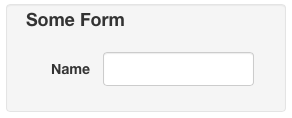
Once you have this code running, you get a basic form (using the Bootstrap3.2.0 theme in this case):

Some Form

This can get much more in-depth: anything you can do declaratively in the XPage XML, you can do programmatically in Java. You can also manipulate existing components: change their properties, rearrange them, or remove them from the tree entirely. I've found knowledge of this to be both useful as a part of the toolbox as well as a way to really clear up the mental model of what's going on on the page.