Quick-and-Dirty Inclusion of a Visual C++ Project in a Maven Build

Sat Jul 11 19:26:34 EDT 2015

Tags: maven jni

One of my projects lately makes use of a JNI library distributed via an OSGi plugin. The OSGi side of the project uses the typical Maven+Tycho combination for its building, but the native library was developed using Visual C++. This is workable enough, but ideally I'd like to have the whole thing part of one smooth build: compile the native library, then subsequently copy its resultant shared 32- and 64-bit libraries into the OSGi plugins.

From what I've gathered, the "proper" way to do this sort of setup is to use the nar-maven-plugin, which is intended to wrap around the normal compilers for each platform and handle packaging and access to the libraries and related components. I tinkered with this a bit but ran into a lot of trouble trying to get it to work properly, no doubt due to my extremely-limited knowledge of C++ toolchains combined with the natural weirdness of Windows's development environment.

For now, I decided to do it the "ugly" way that nonetheless gets the job done: just run the Visual C++ toolchain from Maven. Fortunately, Microsoft includes a tool called msbuild for this purpose: if you run it in the directory of a Visual C++ project, it will act like the full IDE. I added its executables to my PATH (C:\Program Files (x86)\MSBuild\12.0\bin) and then used a Maven plugin called exec-maven-plugin to launch it (the Ant plugin would also work, but this is more explicit). Since this will only run on Windows, I wrapped it in a triggered profile and added two executions to cover both 32-bit and 64-bit versions:

<project>
	...
	<packaging>pom</packaging>
	...
	
	<profiles>
		<profile>
			<id>windows-x64</id>
		
			<activation>
				<os>
					<family>windows</family>
					<arch>amd64</arch>
				</os>
			</activation>
			
			<build>
				<plugins>
					<plugin>
						<groupId>org.codehaus.mojo</groupId>
						<artifactId>exec-maven-plugin</artifactId>
						<version>1.4.0</version>
						<executions>
							<execution>
								<id>build-x86</id>
								<phase>generate-sources</phase>
								<goals>
									<goal>exec</goal>
								</goals>
								<configuration>
									<environmentVariables>
										<Platform>Win32</Platform>
									</environmentVariables>
									<executable>msbuild</executable>
								</configuration>
							</execution>
							<execution>
								<id>build-x64</id>
								<phase>generate-sources</phase>
								<goals>
									<goal>exec</goal>
								</goals>
								<configuration>
									<environmentVariables>
										<Platform>X64</Platform>
									</environmentVariables>
									<executable>msbuild</executable>
								</configuration>
							</execution>
						</executions>
					</plugin>
				</plugins>
			</build>
		</profile>
	</profiles>
</project>

The project itself remains configured in Visual Studio. While the source files are certainly modifiable in Eclipse, it won't have the full C/C++ toolchain environment until I figure out a proper way to do that. But this does indeed do the trick: it creates the two DLLs in the same way as when I had been building them in the IDE.

The next step is to automatically include these in the appropriate OSGi fragment projects. For this, at least for now, I'm using the maven-resources-plugin. This configuration depends on the structure of the Maven projects, which is sort of fragile, but it's not too bad when they're in the same overall project. This is the config for the x64 plugin, and there is a separate x86 project with an almost-identical configuration:

<project>
	...
	<build>
		<plugins>
			...
			<plugin>
				<groupId>org.apache.maven.plugins</groupId>
				<artifactId>maven-resources-plugin</artifactId>
				<version>2.7</version>
				
				<executions>
					<execution>
						<id>copy-native-lib</id>
						<phase>generate-resources</phase>
						<goals>
							<goal>copy-resources</goal>
						</goals>
						<configuration>
							<resources>
								<resource>
									<directory>${project.basedir}/../../native-project-name/x64/Debug/</directory>
									<includes>
										<include>nativelib-win32-x64.dll</include>
									</includes>
								</resource>
							</resources>
							<outputDirectory>${project.basedir}/lib</outputDirectory>
						</configuration>
					</execution>
				</executions>
			</plugin>
		</plugins>
	</build>
</project>

The result is that, at least when I build on Windows, everything is properly compiled and put in its right place. When running in my normal Mac dev environment, it uses the built libraries that have previously been copied into the plugin, so it still works well enough.

This is still a far cry from an optimal configuration. The requirement of using Visual Studio is cumbersome, which means that any multi-platform build will mean a redundant config (whether it be in the pom or in a separate Makefile), and this current setup isn't properly "Mavenized": the output doesn't go into the "target" folder and the DLLs aren't tagged for inclusion in the installed Maven repo. It suits the purpose, though, of being an intermediate step in a larger build.

My long-term desire is to get this fully cross-platform and automated on a build server. That will involve a lot of learning about the nar-maven-plugin (or Makefiles) as well as either setting up a cross-compilation infrastructure or a series of Jenkins slaves. In theory, an OS X system can have everything it would need to build for the other platforms itself, but I've gathered that the safest way to do it is with the "multiple Jenkins nodes" route. When I develop an improved build system for this, I'll write followup posts.

Working with Rich Text's MIME Structure

Wed Jul 08 20:28:19 EDT 2015

Tags: mime

My work lately has involved, among other things, processing and creating MIME entities in the format used by Notes for storage as rich text. This structure isn't particularly complicated, but there are some interesting aspects to it that are worth explaining for posterity. Which is to say, myself when I need to do this again.

As a quick primer, MIME is a format originally designed for email which has proven generally useful, including for HTTP and, for our needs, internal storage in NSF. Like many things in programming, it is organized as a tree, with each node consisting of a set of headers (generally, things like "Content-Type: text/html"), content, and children.

Domino stores the text part of rich text in MIME as HTML. In the simplest case, this ends up a one-element "tree", which you can see in the document's properties dialog:

Content-Type: text/html; charset="US-ASCII"

<font size=2 face="sans-serif">Hello <b>there</b></font>

There's slightly more to its full storage implementation (like the MIME_Version item), but the MIME Part items are the important bits. This simple structure can be abstracted to this tree:

  • text/html

Things get a little more complicated when you add embedded images and/or attachments. When you do either of those, the MIME grows to multiple items and becomes a multi-node tree.

Embedded Images

When you add an embedded image in the rich text field, the storage grows to four same-named MIME Part items. Concatenated (and clipped for brevity), the items then look like:

Content-Type: multipart/related; boundary="=_related 006CEB9D85257E7C_="

This is a multipart message in MIME format.

--=_related 006CEB9D85257E7C_=
Content-Type: text/html; charset="US-ASCII"

<font size=3>Here's a picture:</font>
<br>
<br><img src=cid:_2_0C1832A80C182E18006CEB9885257E7C style="border:0px solid;">
<br>
<br><font size=3>Done.</font>

--=_related 006CEB9D85257E7C_=
Content-Type: image/jpeg
Content-ID: <_2_0C1832A80C182E18006CEB9885257E7C>
Content-Transfer-Encoding: base64

*snip*

--=_related 006CEB9D85257E7C_=--

You can see the same sort of HTML block as before contained in there, but it sprouted a lot of other stuff. To begin with, the starting part turned into "multipart/related". The "multipart" denotes that the top MIME entity has children, and the "related" is used when the children consist of an HTML body and inline images. There are delimiters used to separate each part, using the auto-generated convention of "related" plus an effectively-random number. The image itself is represented as a MIME Part of its own, in this case stored inline and Base64-encoded (it can be shifted off to an attachment by Notes/Domino after a certain size). This structure can be abstracted to:

  • multipart/related
    • text/html
    • image/jpeg

The HTML is designed so that there is an image tag that references the attached image using a "cid" URL, an email convention that basically means "find the entity in this related MIME structure with the following content ID" - you can then see the content ID reflected in the JPEG MIME Part. This sort of URL doesn't fly on the web, so anything displaying this field on a web page (or otherwise converting it to a non-MIME storage format) needs to translate that reference to something appropriate for its needs.*

Attachments

When you have a rich text field with an attachment (in this case without the embedded image), you get a very similar structure:

Content-Type: multipart/mixed; boundary="=_mixed 006EBF7C85257E7C_="

This is a multipart message in MIME format.

--=_mixed 006EBF7C85257E7C_=
Content-Type: text/html; charset="US-ASCII"

<font size=3>Here's an attachment: <br>
</font>
<br>
<br><font size=3><br>
Done. </font>

--=_mixed 006EBF7C85257E7C_=
Content-Type: application/octet-stream; name="cert.cer"
Content-Disposition: attachment; filename="cert.cer"
Content-Transfer-Encoding: binary

cert.cer

--=_mixed 006EBF7C85257E7C_=--

The structure is the same sort of tree as previously, but the "related" content sub-type has changed to "mixed". This indicates that there are multiple types of content, but they're conceptually distinct. In any event, the tree looks like:

  • multipart/mixed
    • text/html
    • application/octet-stream

"application/octet-stream" is a generic MIME type for, basically, "bag of bytes" - MIME-based tools use it when they either don't know the content type or, as in this case, don't care. In this case, Notes/Domino splits out the content to be an NSF-style attachment and then references that in the MIME - this is an implementation detail, though, as the API returns the value regardless.

This also highlights a minor limitation in rich text storage: attachments do not have an inline representation in the HTML, and so they are always moved to the end of the field in Notes. At first, I was peeved by this limitation, but it makes a sort of sense: cid references are really about images, and I guess Lotus didn't want to override that for use in normal link elements.

That brings us to the final potential structure you're likely to run across:

Embedded Images And Attachments

When you include both embedded images and attachments, things get slightly more complicated. I'll skip the raw MIME and go straight to the tree:

  • multipart/mixed
    • multipart/related
      • text/html
      • image/jpeg
    • application/octet-stream

So this becomes a combination of the two formats, and a bit of logic emerges. In Notes's structure, "multipart/mixed" always contains two or more children, and the first one is the textual body, whatever form that may take. One of those forms is just a single-part "text/html", and the other is a "multipart/related" subtree containing the "text/html" and one or more images.


Once you get a feel for these structures, it makes the task of reading and creating Notes-alike MIME items much less daunting. There are a number of other concerns I've been dealing with as well (such as the conversion of composite-data rich text to HTML and how there are two ways to do it), and maybe I'll make a followup post at some point about those.


* As a minor note on this point, it's an area where the Notes client and XPages diverge slightly. The Notes client (which generated the example above), leaves inline images "nameless" - they contain no "Content-Disposition" header and no name in the "Content-Type", instead sticking with just the "Content-ID" for identification. With XPages, however, presumably due to the fact that it has filename information during the upload process, the result still contains (and is referenced by) the "Content-ID" value, but it also contains a line like:

Content-Disposition: inline; filename="foo.jpg"

This functions the same way for most purposes, but it may be significant. For example, if you happen to write processing code that uses the presence of absence of the "Content-Disposition" header as an indicator of whether it's an attachment or not, knowing this ahead of time could save you a certain amount of headache. The right way to do it is to see if the header is either missing or has a basic value of "inline" instead of "attachment".

Quick Tip: Override Form-XPage Mapping in xsp.properties

Thu Jun 11 14:17:19 EDT 2015

Tags: xpages

This is sort of an esoteric feature, but I just ran across it and it fits nicely into an XPages bag of tricks.

Specifically, as it turns out, there's a way to override the default "which XPage should be used for this document?" behavior in some cases. The most-commonly-known behavior is the "Display XPage Instead" set on the form (or the default form if-and-only-if the document has an empty Form field). This wins in all cases, and is the only way to get an XPage to open for a document when using non-XPage-specific URLs, such as traditional-and-clean-ish "db.nsf/viewname/key" URLs.

There's also a secondary behavior that I knew about before, which is that, if it can't find an explicit XPage for the form, it looks for an XPage that matches the form name. So, for example, "SomeForm" becomes "SomeForm.xsp" (case-sensitive, except the first letter). I used this once upon a time to be able to have XPages for documents stored in remote databases without changing the design of those databases (you can also specify an $XPageAlt field on the remote form without the XPage existing in that DB, by the way).

What I learned today is that there's a way to short-circuit that fallback and specify an alternative via xsp.properties. Specifically, you can add a line that looks like this:

xsp.domino.form.xpage.testform=OtherForm

Note that there are a few notes here:

  • This only works for "$$OpenDominoDocument.xsp" URLs, because the XSP runtime is not consulted for "view/key" URLs unless the form explicitly names an XPage.
  • This does not override an explicitly-named XPage in the form.
  • This does work when no form with the specified name actually exists in the database.
  • The form name must be lowercase in the property.
  • The form name must also be properly escaped as per the rules for properties files; importantly, this means that spaces in the form name must be preceded by a backslash.
  • This does work to specify an XPage for the default form when no form is specified in the document.

Most of the time, this trick won't be needed, since either specifying an XPage name in the URL or designating it in the form note will suffice. However, if you're in a case where you have an app that points to data in remote databases and you don't want to modify the design there but still want to use "$$OpenDominoDocument" URLs, this is an option.

Parsing JSON in XPages Applications

Thu May 21 12:47:53 EDT 2015

Tags: json java

David Leedy pointed out to me that a post I made last year about generating JSON in XPages left out a crucial bit of followup: reading that JSON back in. This topic is a bit simpler to start with, since there's really just one entrypoint: com.ibm.commons.util.io.json.JsonParser.fromJson(...).

There are a few variants of this method to provide either a callback to call during parsing or a List to fill with the result, but most of the time you're going to use the variants that take a String or Reader of JSON and convert it into a set of Java objects. As with generating JSON, the first parameter here is a JsonJavaFactory, and which static instance property you choose matters a bit. Contrary to the first-Google-result documentation, there are three types, and they differ slightly in the types of objects they output:

  • instance: This uses java.util.HashMap for JSON objects/maps and java.util.ArrayList for JSON arrays.
  • instanceEx: This is like instance, but uses JsonJavaObject for JSON objects/maps.
  • instanceEx2: Like instanceEx, this uses JsonJavaObject for objects/maps but also uses JsonArray for JSON arrays.

Since JsonJavaObject and JsonArray implement the normal Map<String, Object> and List<Object> interfaces you'd expect (and, indeed, subclass HashMap and ArrayList), you can treat them interchangeably if you're just using the interfaces like you should, but it may matter if you're doing something where you expect certain traits of one of the concrete classes or want to use the explicit getString, etc. methods on the JSON-specific ones.*

Anyway, with that out of the way, the actual code to use these is pretty straightforward:

String json = "{ \"foo\": 1, \"bar\": 2}";
Map<String, Object>result = (Map<String, Object>)JsonParser.fromJson(JsonJavaFactory.instance, json);

In this case, I'm immediately casting the result from Object to Map because I'm sure of the contents of the JSON. If you're less confident, you should surround it with instanceof tests before doing something like that. In any event, that's pretty much all there is to it. As with generating JSON, SSJS wraps this functionality in a fromJson method (which may or may not produce the same objects; I haven't checked).


* You could also subclass the standard as the code does if you have specific needs or desires, like using a LinkedHashMap instead of HashMap to preserve the order of the object's keys.

Quick PSA: LS2J Problems in 9.0.1 FP3

Tue May 19 14:25:11 EDT 2015

Tags: java

While I'm at it, I realized that it may be useful to further spread information about the problem that led to me fiddling with the latest IFs and JVM patches in the first place: the LS2J problems in 9.0.1 FP3. Specifically, it's borked. The main way most people have encountered this is via an exception dialog when attempting to add new plugins to an Update Site NSF, since that uses LS2J to accomplish its task - it displays several layers of stack and the upshot is that there's a java.lang.InternalError about calling a constructor.

The fix is to install the JVM patch from here; Interim Fix 3, while also worth an install, doesn't cover this.

There's another caveat about that, though, for those who have both Notes and Domino installed on the same machine. Since the installer for the JVM patch is the same for both, it will pick one of the two and not give you a choice to choose the other. In the case of the 64-bit patch (I don't know why it picks the client in that case), Ulrich Krause posted workaround steps. In my case, both were 32-bit, it found Domino first and not Notes, and the same commands didn't work. My ugly workaround was to fireup regedit, browse to (if I recall correctly) HKEY_LOCAL_MACHINE\SOFTWARE\IBM and rename the "Domino" folder/key to something else, run the installer, and then rename the folder/key back.

Quick Tip: Re-Enabling Disabled Designer Plugins

Tue May 19 12:58:05 EDT 2015

Tags: designer

Recently, I had a case where my installed Designer plugins stopped appearing, immediately made obvious by the libraries disappearing from XPages applications and Designer listing hundreds of class-not-found errors. At first, I figured that the local plugins had been deleted, but trying to install from update sites curtly informed me that they contained nothing new for me.

It turned out that my local plugins had been somehow marked disabled by Designer. The fix for this was to go to File → Application → Application Management (you may have to launch Designer to see this option) and to enable them there. Crucially, the disabled plugins didn't show up until I clicked the "Show Disabled Features" button (forgive the grossly-outdated Notes version on this client machine):

Once I did that, the second category of plugins (in the data folder) listed everything I expected, and I was able to re-enable them there. One hitch to this process is that it requires sticking to the dependency order, so some plugins may refuse to be enabled until you enable others (commonly, any that depend on the Extension Library).

I'm not sure what specifically caused all these plugins to take a nap, but I suspect it's related to a recent Interim Fix or the Java update, since it happened around when I installed those, and I've heard others report the same behavior.

How I Use JAX-RS in the frostillic.us Framework

Fri May 01 17:59:14 EDT 2015

Tags: java rest

Inspired by Toby Samples's new blog series on JAX-RS in Domino, I'd like to share a description of how I made use of it to write the REST services in the frostillic.us Framework. This is not intended to be a from-scratch introduction - Toby is handling that well so far - but instead assumes a certain amount of knowledge with OSGi development and why you would want to do this in the first place.

The goal of my REST services is to provide an automatic REST/JSON API for any Framework model objects used in a database without having to include any servlet code in the database itself. It's a business-logic-friendly analogue to the Domino Access Services and "borrows" heavily from that code base. It doesn't use the DAS extension point, though, in large part because I didn't know that existed until recently. As far as I can tell, using that extension point saves you some bootstrapping work and makes it possible to enable/disable the service in the server config, but otherwise the work will likely be fairly similar.

Initial Setup

To get started, this will all have to take place in a plugin, unless it turns out there's a way to do it in-NSF. In this case, this made sense anyway, since I wanted the servlets to be available for everything. The first step was to make a stub class to act as the base of the servlet, even though it doesn't really do anything:

package frostillicus.xsp.model.servlet;

import javax.servlet.ServletException;
import com.ibm.domino.services.AbstractRestServlet;

public class ModelServlet extends AbstractRestServlet {
	private static final long serialVersionUID = 1L;

	public static ModelServlet instance;

	public ModelServlet() {
		instance = this;
	}

	@Override
	protected void doInit() throws ServletException {
		super.doInit();
	}
}

Once that class existed, I registered it in the plugin.xml as a servlet extension:

<extension id="frostillicus.xsp.model.Servlet" name="fmodelservlet" point="org.eclipse.equinox.http.registry.servlets">
	<servlet alias="/fmodel" class="frostillicus.xsp.model.servlet.ModelServlet">
		<init-param name="applicationConfigLocation" value="/WEB-INF/fmodelapplication"/>
		<init-param name="propertiesLocation" value="/WEB-INF/fmodelservlet.properties"/>
		<init-param name="DisableHttpMethodCheck" value="true"/>
	</servlet>
</extension>

In addition to that servlet class, it also references two text files to provide configuration for Wink, the JAX-RS implementation packaged with the Extension Library. The first is a list of resource classes to use in the servlet:

frostillicus.xsp.model.servlet.resources.ApiRootResource
frostillicus.xsp.model.servlet.resources.ManagersResource
frostillicus.xsp.model.servlet.resources.ManagerResource
frostillicus.xsp.model.servlet.resources.ModelResource

The second is a properties file with configuration options (I don't remember why this option is important):

wink.defaultUrisRelative=false

Implementing a Resource

The classes listed above are what receive a REST request (funneled through Wink/JAX-RS) and provide a response. As an example, here's the ManagerResource class:

package frostillicus.xsp.model.servlet.resources;

import java.io.IOException;
import java.net.URI;
import java.util.Map;
import java.util.HashMap;

import javax.ws.rs.Consumes;
import javax.ws.rs.GET;
import javax.ws.rs.POST;
import javax.ws.rs.Path;
import javax.ws.rs.PathParam;
import javax.ws.rs.Produces;
import javax.ws.rs.WebApplicationException;
import javax.ws.rs.core.Context;
import javax.ws.rs.core.MediaType;
import javax.ws.rs.core.Response;
import javax.ws.rs.core.Response.ResponseBuilder;
import javax.ws.rs.core.UriInfo;

import org.openntf.domino.Database;

import com.ibm.commons.util.io.json.JsonException;
import com.ibm.commons.util.io.json.JsonGenerator;
import com.ibm.commons.util.io.json.JsonJavaFactory;
import com.ibm.domino.commons.util.UriHelper;
import com.ibm.domino.das.utils.ErrorHelper;

import frostillicus.xsp.model.ModelManager;
import frostillicus.xsp.model.ModelObject;
import frostillicus.xsp.model.ModelUtils;
import frostillicus.xsp.util.FrameworkUtils;

@SuppressWarnings("unused")
@Path("{managerName}")
public class ManagerResource {

	@GET
	@Produces(MediaType.APPLICATION_JSON)
	public Response getManager(@Context final UriInfo uriInfo, @PathParam("managerName") final String managerName) {
		try {
			Map<String, Object> result = new HashMap<String, Object>();
			Database database = FrameworkUtils.getDatabase();
			if(database == null) {
				result.put("status", "error");
				result.put("message", "Must be run in the context of a database.");
			} else {
				Class<? extends ModelManager<?>> managerClass = ModelUtils.findModelManager(database, managerName);
				if(managerClass == null) {
					result.put("status", "failure");
					result.put("message", "No manager found for name '" + managerName + "'");
				} else {
					result.put("status", "success");
					result.put("managerClass", managerClass.getName());
				}
			}

			return ResourceUtils.createJSONResponse(result, false);
		} catch (Throwable e) {
			return ResourceUtils.createErrorResponse(e);
		}
	}

	@POST
	@Consumes(MediaType.APPLICATION_JSON)
	public Response createModel(final String requestEntity, @Context final UriInfo uriInfo, @PathParam("managerName") final String managerName) {

		Database database = FrameworkUtils.getDatabase();
		Class<? extends ModelManager<?>> managerClass = ModelUtils.findModelManager(database, managerName);
		if(managerClass == null) {
			return ErrorHelper.createErrorResponse("Manager '" + managerName + "' not found.", Response.Status.NOT_FOUND);
		}

		URI location;
		try {
			ModelManager<? extends ModelObject> manager = managerClass.newInstance();
			ModelObject model = manager.create();
			ResourceUtils.updateModelObject(requestEntity, model, false);

			location = UriHelper.appendPathSegment(uriInfo.getAbsolutePath(), model.getId());
		} catch(Throwable t) {
			return ResourceUtils.createErrorResponse(t);
		}

		ResponseBuilder builder = Response.created(location);
		Response response = builder.build();
		return response;
	}
}

There are quite a few concepts at work here, as well as tons of logic wrapped up in the referenced ResourceUtils and ModelUtils classes. The term "manager" in this class has no special meaning for JAX-RS or servlets - it's the term the Framework uses for the objects that provide access to models, like the "Posts" manager that maps requests for "all" to a back-end view named "Posts\All" and returning "Post" objects.

This is where things get hairy and diverge from basic servlet creation and head into Domino/XPages-specific eccentricities.

A Secret Double Life

The job of the model servlet is a bit strange, in that it doesn't want to just read document data from an NSF, but also should read and process Java classes. Framework model classes are defined in the NSF, not in plugins, and so the servlet has no real knowledge of what's inside the NSF, other than that it should look for classes that implement the appropriate interfaces.

When code is executing in an OSGi servlet context like this, it sits in a strange grey area. It's a better spot than agents - which have no knowledge of OSGi plugins or the XSP runtime - but it's not quite an XPages context, either, and there's no FacesContext available. Instead, a class called ContextInfo provides access to the session (running as the currently-authenticated Domino user) and the current database, if applicable. That "if applicable" comes in because an OSGi servlet can be accessed either as "http://foo.com/servletname" or as "http://foo.com/bar.nsf/servletname". I modified my utility class to paper over the difference between these two environments. The manager resource calls ModelUtils.findModelManager with this database context to try to find the requested manager. For example, if the request comes in as "/fmodel/Posts", it will search the database for a class or managed bean named "Posts".

This is where the ability to treat an NSF as a "bag of classes" comes in handy. It may be possible to do this another way, but I'm using the DatabaseClassLoader provided by ODA to perform searches on the Java classes contained in an NSF. For this purpose, the actual names and structure of the classes are irrelevant, only that they implement ModelManager. If such a class is found, then the servlet knows enough about it, thanks to the interface, to fetch collections and individual model objects as necessary.

Bits and Bobs

In addition to the trickery required to pull manager and model classes out of an NSF, there are also a number of other techniques and components, mostly lifted from the ExtLib, used to make this work.

The code makes heavy use of JsonWriter to produce JSON in a lightweight manner, rather than building up and then spitting out large blobs of JSON, which is particularly important with large amounts of data.

The AbstractDominoModel class needed a lot of reworking to exist in the not-quite-XPages environment. In an XSP context, it makes use of an inner DominoDocument object in order to be able to deal with file attachments more easily, but that doesn't work without the full context. Accordingly, it uses a holder class to paper over the difference between DominoDocument and "manually" accessing the ODA Document. Of particular note is the handling of rich text for export into the REST display. It uses the HTML converter class included in DominoUtils, which I assume uses the HTMLConvertItem C function underneath the hood. It then uses the converter object to output an HTML version of the rich-text item as well as URLs for any attachments.

There is a certain amount of number fiddling and off-by-one-error-prone work done to determine the first and last entries in a model collection to show. As with DAS, it supports both the "Range" header and "start" and "count" GET parameters.

I nabbed wholesale IBM's shim implementation of the PATCH method, which isn't included in the version of Wink shipped with the ExtLib (at least not when I wrote this). Ideally, PATCH would mean that the JSON provided to the server would only be used to update fields in-place (leaving any fields in the model not included in the JSON untouched), while PUT would replace the model object entirely (removing any model fields not present in the JSON). In reality, they both act as PATCH.

As with XPages access to model objects, the REST APIs work with the JPA annotations used in model objects for validation. The model objects check their context - in an XPages context, failed validations result in FacesMessages, while otherwise it throws a ConstraintViolationException. When this exception occurs in the servlet, the error-response method picks up on that and generates specialized JSON to provide an explanation of the failed constraints to the user.

So Yeah

If you haven't tried out JAX-RS servlets yet, don't let this list of caveats and complicated code daunt you. This specific case of working with model objects in a very generic way naturally leads to complicated code, and the annotation-based coding system of JAX-RS/Wink reduces the amount of code dramatically. None of my code has to deal with fetching HTTP requests or parsing query parameters into useful objects - the API does that for me. There's no doubt a good deal more I could have it do for me as well. This is a pretty clean way to write servlets and is absolutely the best way to write them when the code makes sense to exist in a plugin.

Musing About Multi-App Structure

Tue Apr 28 12:25:39 EDT 2015

Tags: musing

One of the projects I'm working on is going to involve laying the foundations for a suite of related XPages applications, and so I've been musing about the best way to accomplish that. I'll also want to do something similar down the line for OpenNTF, so this is a useful track for consideration. Traditionally, Notes and XPages applications are fairly siloed: though they share authentication information and some configuration via groups, integration between them is fairly ad-hoc.

I'm not sure what the final structure will involve, but for now I'll assume it will use my framework or something similar. Though my Framework provides a lot of the structure that will be needed in this sort of project, it doesn't answer the inter-app question. In each app, responsibilities are clearly defined, model objects follow a consistent structure (and can point to other data sources), and putting all the undergirding code in the plugin makes for very lean in-app codebases.

There are a couple main points of integration I can think of: permissions, findability (i.e. what's the URL to link from App A to App B), and business objects/models. The first way is best covered the traditional way - just make groups and use that in the ACLs - so I'm not going to sweat that one too much. Theoretically, it could be useful to have a companion app to manage ACLs in a friendly way, but that's not needed at this point. That leaves the others, which are related but have their distinct needs. I've been thinking of a couple potential setups.

One Big Honkin' App

I could just throw everything into one app. This would have some immediate benefits: everything is already "shared" by virtue of being in the same place already, and it would make it very easy to move the app "bundle" around and to have multiple distinct instances on a server. Additionally, caching opportunities would abound, so this could make for some heavy performance boosts - and I don't know of any particular performance down sides of having a lot of XPage code in one NSF. It would make it easier to handle common UI elements, but, since my development style already favors using stock or ExtLib controls paired with renderers, the need for reusable custom controls is lower than usual.

The down sides are fairly obvious, though. Putting everything in one NSF makes for a difficult-to-navigate codebase long-term, and with a suite of applications that will likely have multiple developers, that's a recipe for a miserable experience. Additionally, the XPages/NSF dev environment doesn't provide any affordances for compartmentalizing design elements - all XPages are just going to sit in a single flat list. There's the IBM-style convention of stuff like "admin_home.xsp", "prople_list.xsp", which I adopt for most apps, but that would fall on its face when you start getting to "app1_admin_home.xsp". This would also make it difficult to develop a new companion app down the line, adding to the compartmentalizing woes.

So... I don't think I want to do that.

Business Logic in a Plugin

I could go the almost-opposite route and move most of the business logic into an OSGi plugin, and then the individual apps would contain almost exclusively UI - XPages that refer to these plugin-side model objects and deal just with the mechanics of displaying the data and interacting with the user.

This would have some nice advantages. The XPages apps themselves would be extremely slim and I could move what common custom controls do exist into the plugin. That would remove a chunk of the worries about bundling absolutely everything into one place, and the split of "logic" and "UI" is a classic and important one, and would scale nicely in a situation where developers are split into front-end and back-end. It would also retain the cache and share-config benefits of the "one big app" approach.

However, this would retain the problem of monolithic business logic, solving very few of the issues of having multiple developers working on separate modules, or wanting to add new ones to an existing basis. Additionally, the process of developing each module would be a huge PITA: changes would involve parallel modifications to the plugin and the NSF, and the experience of rapid development in an OSGi plugin is not great. This would also wander into the multi-tenancy problem, where the centralized code would have to know about distinct instances of the app group deployed on the server. This is a problem that will show up in most configurations, but I don't think this option brings enough to the table to compensate.

"Normal" separation

I could also go the "normal" route and have the apps know about each other in a fairly ad-hoc way. This wouldn't be too bad, overall - the apps could find each other via in-app configuration documents (or, most likely, a more-centralized variant on that approach).

The primary benefit here is that developing each app would be very easy, since it would be the same as any other Framework-based app. And, while the apps wouldn't be truly sharing code, they would be structured similarly, lowering the hurdle of working on multiple ones. Modularity and splitting responsibilities between multiple developers would be fairly straightforward.

The severe down side, though, is the question of shared model logic. If one app has a notion of "Person" that is a shared concept across all apps, how do the others know about it? I could copy the Java classes around from app to app - they'd all point to the same data - and make sure they're in sync either via templates or manually, but that is awful. This seat-of-the-pants sort of integration wouldn't go far enough.

Services and Coordinator

This approach would be similar to the "normal" separation, but I would develop a way for apps to pull in the business logic from other ones. For example, if an app wants to use the same "Person" class that another app defined, I could write a "coordinator" plugin that would find the class in the appropriate app and load it for this one. This is actually similar to something my Framework already does: its REST services consist of a JAX-RS/Wink servlet in the OSGi plugin which loads model objects from inside the NSF without having to have in-depth knowledge of the class.

This is made relatively simple by the fact that my model objects and collections implement standard interfaces - DataObject and List respectively, plus more-specific variants for additional capabilities - and they enforce their behavior and constraints through the standardized methods. So if, for example, the Person object has a getManager method that returns the person's manager as an object, calling getValue("manager") would use this method and return the right thing. The "consumer" code wouldn't have the benefit of seeing the actual methods on the class and so would have to know what to call the fields by convention, but honestly I've found this convention-based route to be entirely practicable.

The other side of this would be the "coordinator" plugin, which would handle knowledge of how to access other parts of the suite, so the individual apps would request of it "I would like the Person manager from the StaffAdmin app", or something to that effect. This would have to include some way to solve the multi-tenant and database-location problem, which is a largely-unavoidable issue. Once this plugin is in place, it would presumably require little ongoing work, with primary development happening in the NSFs.

As the explanation-heavy and down-side-light nature of this section implies, this is the sort of approach I'm leaning towards.

Black Magic

There are also other approaches and techniques I've been thinking about - such as trying to figure out how to load XPages from one DB in a central one so they act like a single pool, coming up with some sort of abstract model-definition format and generating app UIs from that, or just write the whole thing in plugins. I probably won't go down those sorts of routes - this is supposed to be maintainable by Domino developers - but it's always good to think about the more-out-there options, so I don't cut off future possibilities.

Building on ODA's Maven-ization

Tue Mar 31 20:30:49 EDT 2015

Tags: maven oda

Over the weekend, I took a bit of time to apply some of my hard-won recent Maven knowledge to a project I wish I had more time to work with lately: the ODA. The development branches have been Maven-ized for half a year or so, but primarily just to the point of getting the compile to work. Now that I know more about it, I was able to go in and make great strides towards several important goals.

As a preliminary note: don't take my current implementations as gospel. There are parts that will no doubt change; for example, there are some intermittent timing issues currently with the final assembly. But the changes I did make have borne some early fruit.

Source Bundles

Over the releases, it's proven surprisingly fiddly to get parameter names, inline Javadoc, and attached source to work in Designer, leaving some builds no better off than the legacy API in those regards. The apparently-consistent fix for this is the use of "source" plugins: OSGi plugins that go alongside the normal one that just contain the source of each class. Those aren't too bad to generate manually from Eclipse, but the point of Maven is getting away from that sort of manual stuff.

Fortunately, Tycho (the OSGi toolkit for Maven) includes a plugin that allows you to generate these source bundles alongside the normal ones, by including this in the list of plugins executed during the build:

<plugin>
	<groupId>org.eclipse.tycho</groupId>
	<artifactId>tycho-source-plugin</artifactId>
	<version>${tycho-version}</version>
	<executions>
		<execution>
			<id>plugin-source</id>
			<goals>
				<goal>plugin-source</goal>
			</goals>
		</execution>
	</executions>
</plugin>

Once you have that (which I added to the top-level project, so it cascades down), you can then add the plugins to the OSGi feature with the same name as the base plugin plus ".source". Eclipse will give a warning that the plugins don't exist (since they exist only during a Maven build), but you can ignore that.

Javadoc

Javadoc generation is an area where I suspect I'll make the most changes down the line, but I managed to wrangle it into a spot that mostly works for now.

Not every project in the tree needs Javadoc (for example, we don't need to include docs for third-party modules necessarily), but it's still useful to specify configuration. So I took the already-existing basic config in the parent pom and moved it to pluginManagement for the children:

<pluginManagement>
	<plugins>
		<plugin>
			<!-- javadoc configuration -->
			<groupId>org.apache.maven.plugins</groupId>
			<artifactId>maven-javadoc-plugin</artifactId>
			<version>2.9</version>
			<configuration>
				<failOnError>false</failOnError>
				<excludePackageNames>com.sun.*:com.ibm.commons.*:com.ibm.sbt.core.*:com.ibm.sbt.plugin.*:com.ibm.sbt.jslibrray.*:com.ibm.sbt.proxy.*:com.ibm.sbt.security.*:*.util.*:com.ibm.sbt.portlet.*:com.ibm.sbt.playground.*:demo.*:acme.*</excludePackageNames>
			</configuration>
		</plugin>
	</plugins>
</pluginManagement>

Then, I added specific plugin references in the applicable child projects:

<plugin>
	<groupId>org.apache.maven.plugins</groupId>
	<artifactId>maven-javadoc-plugin</artifactId>
	<executions>
		<execution>
			<id>generate-javadoc</id>
			<phase>package</phase>
			<goals>
				<goal>jar</goal>
			</goals>
		</execution>
	</executions>
</plugin>

With those, the build can generate Javadoc appropriate for consumption in the final assembly down the line.

Assembly

The final coordinating piece is referred to as the "assembly". The job of the Maven Assembly Plugin is to take your project components and output - built Jars, source files, documentation, etc. - and assembly them into an appropriate final format, usually a ZIP file.

The route I took is to add a distribution project to the tree whose sole job it is to wait until the other components are done and then assemble the results. The pom for this project primarily consists of telling Maven to run the assembly plugin to create an appropriately-named ZIP file using what's called an "assembly descriptor": an XML file that actually provides the instructions. There are a couple stock descriptors, but for something like this it's useful to write your own. It's quite a file (and also liable to change as I figure out the best practices), but is broken down into a couple logical segments.

First off, we have a rule telling it to include all files from the "src/main/resources" folder in the current (assembly) projet:

<fileSets>
	<fileSet>
		<directory>src/main/resources</directory>
		<includes>
			<include>**/*</include>
		</includes>
		<outputDirectory>/</outputDirectory>
	</fileSet>
</fileSets>

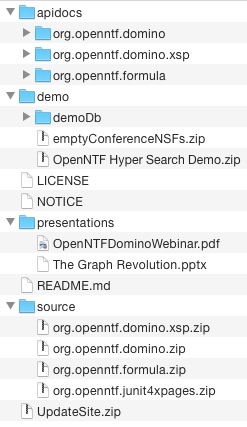
This folder contains a README description of the result as well as the miscellaneous presentations and demo files the ODA has collected over time.

Next, in addition to the source bundles mentioned earlier, I want to include ZIP files of the important project sources in the distribution, for easy access (technically wasteful, but not by too much):

<moduleSet>
	<useAllReactorProjects>true</useAllReactorProjects>
	<includes>
		<include>org.openntf.domino:org.openntf.domino</include>
		<include>org.openntf.domino:org.openntf.domino.xsp</include>
		<include>org.openntf.domino:org.openntf.formula</include>
		<include>org.openntf.domino:org.openntf.junit4xpages</include>
	</includes>
	
	<binaries>
		<attachmentClassifier>src</attachmentClassifier>
		<outputDirectory>/source/</outputDirectory>
		<unpack>false</unpack>
		<outputFileNameMapping>${module.artifactId}.${module.extension}</outputFileNameMapping>
	</binaries>
</moduleSet>

I use the "binaries" tag here instead of "sources" because I want to include the ZIP forms (hence unpack=false) - this is one part that may change, but it works for now.

Next, I gather the Javadocs generated earlier, but these I do want to unpack:

<moduleSet>
	<useAllReactorProjects>true</useAllReactorProjects>
	<includes>
		<include>org.openntf.domino:org.openntf.domino</include>
		<include>org.openntf.domino:org.openntf.domino.xsp</include>
		<include>org.openntf.domino:org.openntf.formula</include>
	</includes>
	
	<binaries>
		<attachmentClassifier>javadoc</attachmentClassifier>
		<outputDirectory>/apidocs/${module.artifactId}</outputDirectory>
		<unpack>true</unpack>
	</binaries>
</moduleSet>

This results in an "apidocs" folder containing the Javadoc HTML for each of those three projects in subfolders.

Finally, I want to include the built and ZIP'd Update Site for use in Designer and Domino:

<moduleSet>
	<useAllReactorProjects>true</useAllReactorProjects>
	<includes>
		<include>org.openntf.domino:org.openntf.domino.updatesite</include>
	</includes>
	
	<binaries>
		<attachmentClassifier>assembly</attachmentClassifier>
		<outputDirectory>/</outputDirectory>
		<unpack>false</unpack>
		<includeDependencies>false</includeDependencies>
		<outputFileNameMapping>UpdateSite.zip</outputFileNameMapping>
	</binaries>
	
	<sources>
		<outputDirectory>/</outputDirectory>
		<includeModuleDirectory>false</includeModuleDirectory>
		<includes>
			<include>LICENSE</include>
			<include>NOTICE</include>
		</includes>
	</sources>
</moduleSet>

While grabbing the Update Site, I also copy the all-important LICENSE and NOTICE files from this current project - these may be best moved to the resources folder above.

The result of all this is a nicely-packed ZIP containing everything a user should need to get started with the API:

Next Steps

So, as I mentioned, this work isn't complete, in large part because I'm still learning the ropes. I suspect that the way I'm gathering the sources in the assembly and generating and gathering the Javadoc are not quite right - and this shows in the way that slightly-different host configurations (like on a Bamboo build server or when doing a multi-threaded build) fail during packaging.

Additionally, it's somewhat wasteful to include the source plugins even for server distributions; I won't really lose sleep over it, but it'd still be ideal to continue the recent policy of providing ExtLib-style distinct Update Sites. I'm not sure if this will require creating multiple feature and update-site projects or if it can be accomplished with build profiles.

Finally, I would love to be able to get rid of the source-form third-party dependencies like Guava and Javolution. One of the main benefits of Maven is that you can very-easily consume dependencies by listing them in the config, but Tycho and Eclipse throw a wrench into that: when you configure a project to use Tycho, then Eclipse stops referencing the Maven dependencies. Moreover, even though I believe all of the dependencies we use contain OSGi metadata, which would satisfy a Tycho command-line build, both Eclipse and the requirement that we build an old-style (non-p2) Update Site prevent us from doing that simply. It's possible that the best route will be to have Maven download and copy in the Jar files of the dependencies, but even that has its own suite of issues.

But, in any event, it's satisfying seeing this come together - and nice for me personally to build on the work Nathan, Paul, and Roland-and-co. have been doing lately. Maven is a monster and still suffers from severe "how the F does this stuff work?" problems, but it does feel good to put it to work.

Auto-OSGi-ifying Maven Projects

Sat Mar 28 16:15:59 EDT 2015

Tags: maven

In my last post, I discussed some of the problems that you run into when dealing with Maven projects that should also be OSGi plugins, particularly when you're mixing OSGi and non-OSGi projects in the same Maven build (in short: don't do that). Since then, things have smoothed out, particularly when I split the OSGi portion out into another Maven build, allowing it to consume the "core" artifacts cleanly, without the timing issue described previously.

But I ran into another layer of the task: consuming the Maven artifacts as plain Jars is all well and good, but the ideal would be to also have them available as a suite of OSGi plugins, so they can be managed and debugged more easily in an OSGi environment like Eclipse or Domino. Fortunately, this process, while still fairly opaque, is smoother than the earlier task.

A note on terminology: the term "plugin" can refer to both the OSGi component as well as the tools added into a Maven build. The term "bundle" aptly describes the OSGi plugins as well, but I'm used to "plugin", so that's what I use here. It's probably the case that an OSGi plugin is a specialized type of bundle, but whatever.

Preparing the Plugins

The route I'm taking, at least currently, is to tell the root Maven project that all of its Jar-producing children should also have a META-INF/MANIFEST.MF file packaged along to allow for OSGi use, and moreover to automatically generate that manifest using the maven-bundle-plugin. The applicable code in the parent pom.xml looks like this:

<build>
    <pluginManagement>
        <plugin>
            <groupId>org.apache.felix</groupId>
            <artifactId>maven-bundle-plugin</artifactId>
            <version>2.1.0</version>
            <configuration>
                <manifestLocation>META-INF</manifestLocation>
                <instructions>
                    <Bundle-RequiredExecutionEnvironment>JavaSE-1.6</Bundle-RequiredExecutionEnvironment>
                    <Import-Package></Import-Package>
                </instructions>
            </configuration>

            <executions>
                <execution>
                    <id>bundle-manifest</id>
                    <phase>process-classes</phase>
                    <goals>
                        <goal>manifest</goal>
                    </goals>
                </execution>
            </executions>
        </plugin>
        <plugin>
            <artifactId>maven-jar-plugin</artifactId>
            <version>2.3.1</version>
            <configuration>
                <archive>
                    <manifestFile>META-INF/MANIFEST.MF</manifestFile>
                </archive>
            </configuration>
        </plugin>
    </pluginManagement>
</build>

In order to actually generate the manifest files, I included a block like this in each child project that produces a Jar:

<build>
    <plugins>
        <plugin>
            <groupId>org.apache.felix</groupId>
            <artifactId>maven-bundle-plugin</artifactId>

            <configuration>
                <instructions>
                    <Bundle-SymbolicName>com.somecompany.someplugin</Bundle-SymbolicName>
                </instructions>
            </configuration>
        </plugin>
    </plugins>
</build>

The Bundle-SymbolicName bit is there to translate the project's Maven artifact ID (which would be like "foo-someplugin") into a nicer OSGi version. There are other ways to do this, including just letting it use the default, but it made sense to write them manually here.

Once you do that and then run a Maven package, each Jar project in the tree should get an auto-generated MANIFEST.MF file that exports all of the project's Java classes and specifies a Java 6 runtime and no imported packages. There are many tweaks you can make here - any of the normal MANIFEST entries can be specified in the <instructions/> block, so you could add imported packages, required bundles, or other metadata at will.

If you install these projects into your local repository, then downstream OSGi projects using Tycho can find the dependencies when you include them in the pom.xml by Maven artifact ID and in the downstream MANIFEST.MF by OSGi bundle name. There's one remaining hitch (at least): though Maven will be fine with that resolution, Eclipse doesn't pick up on them. To do that, it seems that the best route is to create a p2 repository housing the plugins, which would also be useful for other needs.

Creating an Update Site

Fortunately, there is actually an excellent example of this on GitHub. By following those directions, you can create a project where you list the plugins you want to include as dependencies in the pom.xml, and it will properly package them into a p2 site containing all the plugins with their OSGi-friendly names and nice site metadata.

As a Domino-specific aside, a "p2 Update Site" is somewhat distinct from the Update Sites we've gotten used to dealing with - namely, it's a newer format that is presumably unsupported by Notes and Domino's outdated infrastructure. You can tell the difference because the "old" ones contain a site.xml file while the p2 format contains content.jar and artifacts.jar (those may be .xml instead). It's just another one of those things for us to deal with.

In any event, the instructions on GitHub do what they say on the tin, but I wanted a bit more automation: I wanted to automatically include all of the plugins built in the project without specifying them each as a dependency. To do this, I replaced Step 2 in the example (the use of maven-dependency-plugin) with the maven-assembly-plugin, which is a generic tool for culling together the results of a build in some useful format. The replaced plugin block looks like this:

<plugin>
	<groupId>org.apache.maven.plugins</groupId>
	<artifactId>maven-assembly-plugin</artifactId>
	<version>2.5.3</version>
	<configuration>
		<descriptors>
			<descriptor>src/assembly/plugins.xml</descriptor>
		</descriptors>
		<outputDirectory>${project.basedir}/target/source</outputDirectory>
		<finalName>plugins</finalName>
		<appendAssemblyId>false</appendAssemblyId>
	</configuration>
	<executions>
		<execution>
			<id>make-assembly</id>
			<!-- Bump this up to earlier than package so that the plugins below see the results -->
			<phase>process-resources</phase>
			<goals>
				<goal>single</goal>
			</goals>
		</execution>
	</executions>
</plugin>

This block tells the assembly plugin to look for an assembly descriptor file (which is yet another specialized XML file format, naturally) named "plugins.xml" and execute its instructions during the phase where it's processing resources, coming in just before the later plugins.

In turn, the assembly descriptor looks like this:

<assembly
	xmlns="http://maven.apache.org/plugins/maven-assembly-plugin/assembly/1.1.2"
	xmlns:xsi="http://www.w3.org/2001/XMLSchema-instance"
	xsi:schemaLocation="http://maven.apache.org/plugins/maven-assembly-plugin/assembly/1.1.2 http://maven.apache.org/xsd/assembly-1.1.2.xsd">
	<id>plugins</id>
	<formats>
		<format>dir</format>
	</formats>
	<includeBaseDirectory>false</includeBaseDirectory>
	<moduleSets>
		<moduleSet>
			<useAllReactorProjects>true</useAllReactorProjects>
			<includes>
				<include>*:*:jar:*</include>
			</includes>
			<binaries>
				<outputDirectory>/</outputDirectory>
				<unpack>false</unpack>
				<includeDependencies>true</includeDependencies>
			</binaries>
		</moduleSet>
	</moduleSets>
</assembly>

What this says is to include all of the modules (Maven artifacts) being processed in the current build that are packaged as Jars and copy them into the designated directory, where they will be picked up by the Tycho plugins down the line.

The result of this Rube Goldberg machine is that all of the applicable plugins in the current build (and their dependencies) are automatically gathered for inclusion in the update site, without having to maintain a specific list.

Missing Pieces

This process accomplishes a great deal automatically, alleviating the need to maintain MANIFEST.MF files or a repository configuration, but it doesn't cover quite everything that might be needed. For one, there's no feature project; the update site is just a bunch of plugins without features to go along with them. Honestly, I don't know if those are even required for most uses - Eclipse seems capable of consuming the site as-is. Secondly, though, the result isn't suitable for use in an old-style environment, so this isn't something you would go plugging into Designer. For that, you'd want a secondary project that wraps the plugins into a feature in an old-style update site, which would have to be done in a second Maven build. Regardless, this seems to get you most of the way, and saves a ton of hassle.