Couchbase StateManager for XPages, Part 2

Fri Feb 21 10:17:33 EST 2014

  1. Jan 29 2014 - Couchbase StateManager for XPages, Part 1
  2. Feb 21 2014 - Couchbase StateManager for XPages, Part 2

I had the opportunity to dive a little back into the StateManager I wrote the other week to try out a theory. The first thing I noticed was that there was a minor problem: it didn't work at all. Specifically, the code I had didn't actually store the whole proper state of the view, so it ended up being regenerated anew each time; the fact that this didn't cause an error was what led me astry.

Fortunately, I was able to scrounge together enough code to get it to work properly, bringing the tree and viewScope along for the ride:

CouchbaseStateManager.java

The impetus of revisiting this was to test whether this setup would be enough to accomplish a fun goal: by having the view state serialized to a commonly-available location, you should be able to switch servers in between actions (e.g. partial refreshes) and still have it work. And indeed, it does! I set up a round-robin load balancer for two of my Domino servers, which more or less switches between Arcturus and Ceres on each hit. In my test page, you can see a refresh count (stored as an instance member of the page's controller class, which is in viewScope) incrementing when you click the button:

https://roundrobin.frostillic.us/tests/ccluster.nsf

You can also see a value stored in "clusterScope", which is an object pointing to the same Couchbase cluster, and so it is similarly available on both servers.

This is pretty promising! It's not the sort of thing you'd do with any old app (importantly, applicationScope and sessionScope are not shared between the servers), but by pairing this with SSO, you could make an app that is resilient and scalable, with an arbitrary number of app servers behind a rotating load balancer without the need of sticky sessions.

Domino the Identity Server

Tue Feb 11 09:10:16 EST 2014

Tags: domino

As seems to happen a lot lately, my fancy was struck earlier by a Twitter conversation, this time about the use of Domino as a personal mail server. Not only do I think there's potential there, but it should go further and be a drop-in replacement for personal mail, calendar, and contacts storage.

I think there's tremendous value in controlling your own domain and the services on it, without being permanently attached to someone else's name for an email address (your school, your company, your ISP, Google). This is good not only for personal freedom, since it lets you pack up and move at will, but also for security, since a large third-party mail service is a particularly juicy target.

Unlike Domino's inherited-but-abandoned place as the preeminent NoSQL server and replicating app-dev platform, Domino is just barely shy of being this server. You could already hit the three main services reasonably well by using the Notes client or iNotes, but actual humans shouldn't have to do that. It's already (more or less) there for mail with IMAP, while support for CardDAV for contacts and CalDAV+public iCalendar feeds would round it out for the other two pillars. Technically, the only things standing in between the existing open-source WebDAV plugin for Domino and this imagined future are the complexities of plugin development and the RFC.

The other main aspects that could make this great are further refinements to Domino's existing capabilities: a bundled spam filter (say, one of the open-source tools that can do the job already) and a strong configuration focus on creating an SSL-secured public-facing server. Non-SSL variants of IMAP, POP (if you must - that could be removed entirely), and HTTP should be off by default and the configuration should encourage you to acquire SSL certificates with your own private keys (the Server Certificate Admin would need a revamp for proper key size and ciphers), as well as S/MIME certificates to tie with each user for signed/encrypted mail outside the Notes client. Though Domino's history with the NSA is... checkered, it's still remarkably well-positioned to provide a secure foundation to deter snooping eyes. Certainly, running a Domino server own your own or a rented/virtual server is leagues better than a fully-managed service in this respect.

Having those features in place and smoothly integrated with a nice setup assistant would make for a very compelling product: an all-in-one, easy-to-install server that runs on several modern OSes and handles secure replication across physical locations at already-actually-affordable prices. Admittedly, I don't know how compelling that product would be for IBM's accountants, but it's certainly compelling for me, and the world could use more decentralization like this.

Couchbase StateManager for XPages, Part 1

Wed Jan 29 15:08:55 EST 2014

  1. Jan 29 2014 - Couchbase StateManager for XPages, Part 1
  2. Feb 21 2014 - Couchbase StateManager for XPages, Part 2

The other day, I attended Tony McGuckin's Connect session on XPages scalability (a companion to his earlier Masterclass on performance) and I was inspired to try out a thought I had: could it work to use Couchbase to further push the bounds of XPages scalability?

If you're not familiar with Couchbase, it's a product similar to CouchDB, which is in turn essentially Domino-the-DB-server re-done for modern needs. Last summer, I wrote some data sources to use Couchbase data in an XPages app in much the same way that you use Domino documents and views.

In addition to Couchbase's nature as a document database, it has another layer from its lineage as a continuation of Membase: its basis is a key-value store, suitable for caching or storing data in a very fast and scalable way. This capability is potentially a perfect match for the needs of XPages state holding: when an XPage is stored in between requests, it's really just taking a Java object and storing it by key either in memory or on disk. By taking Couchbase's key-value capability and using it for this, you end up with something that may (pending testing) really crank up the scalability.

So I wrote a class to do it, and so far, so good: it stores and retrieves the XPages properly and even automatically obeys session timeout to clean up unneeded entries. When I get home, I plan to convert it into a plugin, but for now I've uploaded the Java file:

CouchbaseStateManager.java

To use it, install the Couchbase Java Client (I dropped it in jvm/lib/ext, since adding them as Jars in the NSF was trouble), copy that class into your NSF in the "frostillicus" package, and modify your faces-config.xml and xsp.properties files similar to:

faces-config.xml

<faces-config>
  <application>
    <state-manager>frostillicus.CouchbaseStateManager</state-manager>
  </application>
  ...
</faces-config>

xsp.properties

frostillicus.couchbase.statemanager.uris=http://10.211.55.2:8091/pools
frostillicus.couchbase.statemanager.bucket=default
frostillicus.couchbase.statemanager.username=
frostillicus.couchbase.statemanager.password=

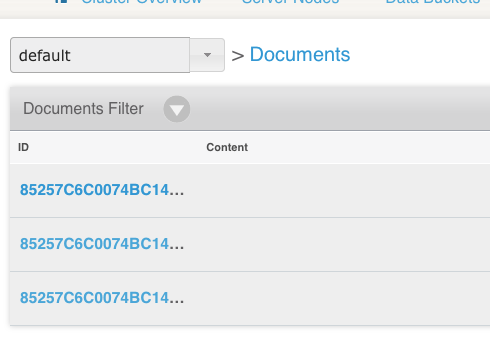
Once you have it up and running, you'll start seeing serialized views being stored in your Couchbase bucket (which is basically like an NSF) keyed by replica ID and the unique XSP view ID:

I'm looking forward to trying this out in a real setup, where I have the XPage running on one server and pointed at a cluster of multiple Couchbase servers elsewhere. This should really play to the strengths of both: it would use JSF's capabilities to take a little work off of the plate of the XPage server while letting Couchbase do its job of spreading the data across its cluster, caching in memory, and so forth. Barring unfixable performance pitfalls, this could push XPages performance and scalability even further.

"Build Automatically", "Refresh automatically", and "Team Development"

Thu Jan 23 18:06:26 EST 2014

TL;DR: "Build Automatically" and "Refresh automatically" are unrelated, but work together when both enabled when using SourceTree for source control.

I just had a conversation on Twitter where I went a little crazy talking about my hopefully-correct view of how the various sync processes in Designer work when you're dealing with source control.

The original impetus was a post by Mark Leusink about the fact that you have to build your NSF project in order to sync it with an on-disk-project (ODP) set up via Team Development. From there, that got into the topic of the "Refresh automatically" Eclipse setting that is helpful when using source control tools outside of Designer (e.g. SourceTree instead of eGit). The problem is that this stack of builders and settings is hard to get a hold of conceptually.

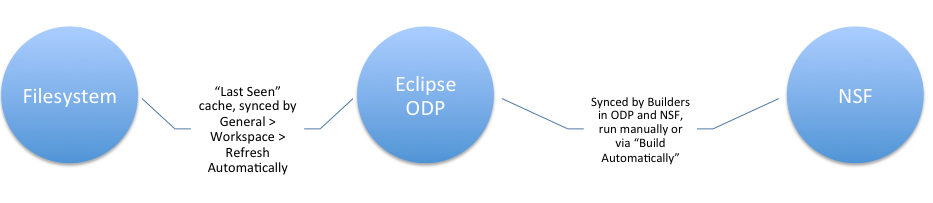
There are three "entities" to know about when it comes to how these things work together, along with a couple processes that can get your source code from one to the other. I tossed together this terrible image to visualize them:

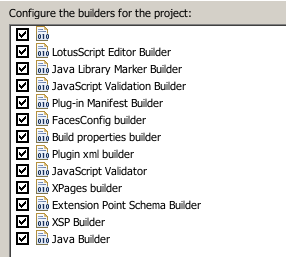
I'll work from right to left, starting with the NSF. That part is nothing new, but the thing to know is how the NSF "knows" how to sync to an ODP. It's done via something called an Eclipse Builder. A Builder is a task you can attach to a project in Eclipse to do essentially arbitrary things when the build process happens for a project (or an individual part of a project). NSFs have a ton of them:

The one in question is the unnamed one at the top (don't ask me why it's nameless): that's the Builder that exports your changes from the NSF to the ODP. There's a companion Builder, also unnamed, in the ODP, that does the reverse when you make a change to the files there (normally you don't, but source control does). Because this sync is implemented with a Builder, it doesn't run automatically when you have "Build Automatically" disabled. Instead, it will run when you manually do a "Build All" or "Clean", or when you choose "Team Development" → "Sync with On-Disk Project" from the application list.

So the Builder handles all of the syncing between the ODP and the NSF. Where does "Refresh automatically" (which is very different from "Build Automatically") come in, and why has it only become a thing recently with the cultural shift away from eGit and towards SourceTree?

The culprit is the way Eclipse/DDE deals with the filesystem. Because OSes have traditionally been bad at notifying programs of when files change on disk, DDE doesn't actually know when a file is changed on disk. This is expected for something like an NSF (say, if someone else adds a view to an NSF you have open, it's no surprise that you have to refresh to see it in Designer (also, don't edit the same NSF from two places like that)), but counterintuitive with local files. The view of the ODP you see in Designer's Package Explorer is analogous to running an "ls" or "dir" command in the terminal and then adding a new file: the output from your command won't change until you run it again. What "Refresh automatically" does is attempt to keep its file listing up-to-date. Later versions of Eclipse modified this option to be more explicit and technical:

The upshot is that turning this on will (hopefully) keep the ODP in step with the filesystem. The chart I made is misleading here: the ODP and filesystem are technically the same storage area, but the ODP you see in DDE is really a listing of what Designer saw the last time it looked.

This is useful when using a tool like SourceTree to handle your source-control operations. Because DDE doesn't normally "know" about filesystem changes, you could update your local source repository from the server with tons of changes, but Designer wouldn't know until you kicked it. With "Refresh automatically", it should notice those changes on its own, update the ODP in Package Explorer, and, if "Build Automatically" is on, sync those changes into your NSF.

The reason this matters now and didn't/doesn't when using eGit is that, because eGit is an Eclipse plugin and does its filesystem access through Eclipse, Designer already knows when a source-control-related operation changes files on the filesystem: since it made the change, it doesn't need to refresh. So if you're using an Eclipse plugin for source control and not editing files on the filesystem manually, you can remain in blissful ignorance about "Refresh automatically."

Data separation with an asterisk

Thu Jan 09 09:50:59 EST 2014

Tags: xpages

A little while ago, I converted over to the practice of separating your XPage app from the NSF that contains the data, even when it's going to be a one-to-one mapping. This confers a number of advantages in the areas of easier testing, easier development, programming discipline, and security. One of my favorite aspects is the ability to do this on your data DB:

Don't allow URL open

This alone adds tons of security: no more worrying about ?ReadViewEntries, hiding your views from the web, errant forms allowing too much access, and so forth. Once you have that checked and you funnel your access through a separate app, the surface of vulnerability is much, much smaller.

But there's a hitch.

I discovered this the other day, and it's only a problem in mixed web/Notes environments: when you have that option enabled, you can't see native rich text content from a document in your XPage. I say "native" to refer to the traditional Composite Data format of rich text; MIME content is fine. The reason for this appears to go down to the C-API level, where setting that flag seems to entirely bar the HTML conversion functions from working with that database.

My guess is that that was deemed the most expedient way to implement the feature at the time, but it's problematic now. I can think of a couple ways to deal with it:

  • Don't use native rich text. If you're writing whole-cloth XPages apps, you don't have to worry about this at all, since MIME/HTML content is still fine. If you have a mixed app and you're fine with some ugly-looking text in the Notes client, you can turn on the field option to store the data as MIME even in the client.
  • Store the app on separate servers. To maintain the security benefits, you could store the data database on a different server, one not publicly accessible via HTTP.
  • Disable that option and use web rules instead. You should probably be able to achieve a lot of the security benefits by substituting all HTTP requests for the data database with blank pages, though that requires coordination of the server config with every DB like this, which is a drag. Also don't forget __$replicaid.nsf URLs.

Fortunately, the fact that it only affects conversion from native rich text to MIME means the impact is limited, but it's still a caveat to data separation.

A Quick, Dirty, and Inefficient @ManagedBean Implementation in XPages

Tue Dec 17 09:24:31 EST 2013

Tags: xpages java

By now, most of us are pretty familiar with the process for adding managed beans to an XPages app: go to faces-config.xml and add a <managed-bean>...</managed-bean> block for each bean. However, JSF 2 added another method for declaring managed beans: inline annotations in the Java class. This wasn't one of the features backported to the XPages runtime, but it turns out it's not bad to add something along these lines, and I decided to give it a shot while working on the OpenNTF API.

The first thing that's required is a version of the annotations that ship with JSF 2. Fortunately, annotations in Java, though ugly to define, are very simple, and each one involves only a few lines of code and can be added to your NSF directly:

javax.faces.bean.ManagedBean

package javax.faces.bean;

import java.lang.annotation.Retention;
import java.lang.annotation.RetentionPolicy;

@Retention(value=RetentionPolicy.RUNTIME)
public @interface ManagedBean {
	String name();
}

javax.faces.bean.ApplicationScoped

package javax.faces.bean;

import java.lang.annotation.Retention;
import java.lang.annotation.RetentionPolicy;

@Retention(value=RetentionPolicy.RUNTIME)
public @interface ApplicationScoped { }

javax.faces.bean.SessionScoped

package javax.faces.bean;

import java.lang.annotation.Retention;
import java.lang.annotation.RetentionPolicy;

@Retention(value=RetentionPolicy.RUNTIME)
public @interface SessionScoped { }

javax.faces.bean.ViewScoped

package javax.faces.bean;

import java.lang.annotation.Retention;
import java.lang.annotation.RetentionPolicy;

@Retention(value=RetentionPolicy.RUNTIME)
public @interface ViewScoped { }

javax.faces.bean.RequestScoped

package javax.faces.bean;

import java.lang.annotation.Retention;
import java.lang.annotation.RetentionPolicy;

@Retention(value=RetentionPolicy.RUNTIME)
public @interface RequestScoped { }

javax.faces.bean.NoneScoped

package javax.faces.bean;

import java.lang.annotation.Retention;
import java.lang.annotation.RetentionPolicy;

@Retention(value=RetentionPolicy.RUNTIME)
public @interface NoneScoped { }

The more-complicated code comes into play when it's time to actually make use of these annotations. There are a couple ways this could be handled, and the route I took was via a variable resolver. Note that this code requires my current branch of the OpenNTF API, though a mild variant would work with the latest M release:

resolver.AnnotatedBeanResolver

package resolver;

import java.io.Serializable;
import java.util.*;
import javax.faces.context.FacesContext;
import javax.faces.el.EvaluationException;
import javax.faces.el.VariableResolver;
import javax.faces.bean.*;

import org.openntf.domino.*;
import org.openntf.domino.design.*;

import com.ibm.commons.util.StringUtil;

public class AnnotatedBeanResolver extends VariableResolver {

	private final VariableResolver delegate_;

	public AnnotatedBeanResolver(final VariableResolver resolver) {
		delegate_ = resolver;
	}

	@SuppressWarnings("unchecked")
	@Override
	public Object resolveVariable(final FacesContext facesContext, final String name) throws EvaluationException {
		Object existing = delegate_.resolveVariable(facesContext, name);
		if(existing != null) {
			return existing;
		}

		try {
			// If the main resolver couldn't find it, check our annotated managed beans
			Map<String, Object> applicationScope = (Map<String, Object>)delegate_.resolveVariable(facesContext, "applicationScope");
			if(!applicationScope.containsKey("$$annotatedManagedBeanMap")) {
				Map<String, BeanInfo> beanMap = new HashMap<String, BeanInfo>();

				Database database = (Database)delegate_.resolveVariable(facesContext, "database");
				DatabaseDesign design = database.getDesign();
				for(String className : design.getJavaResourceClassNames()) {
					Class<?> loadedClass = Class.forName(className);
					ManagedBean beanAnnotation = loadedClass.getAnnotation(ManagedBean.class);
					if(beanAnnotation != null) {
						BeanInfo info = new BeanInfo();
						info.className = loadedClass.getCanonicalName();
						if(loadedClass.isAnnotationPresent(ApplicationScoped.class)) {
							info.scope = "application";
						} else if(loadedClass.isAnnotationPresent(SessionScoped.class)) {
							info.scope = "session";
						} else if(loadedClass.isAnnotationPresent(ViewScoped.class)) {
							info.scope = "view";
						} else if(loadedClass.isAnnotationPresent(RequestScoped.class)) {
							info.scope = "request";
						} else {
							info.scope = "none";
						}

						if(!StringUtil.isEmpty(beanAnnotation.name())) {
							beanMap.put(beanAnnotation.name(), info);
						} else {
							beanMap.put(loadedClass.getSimpleName(), info);
						}
					}
				}

				applicationScope.put("$$annotatedManagedBeanMap", beanMap);
			}

			// Now that we know we have a built map, look for the requested name
			Map<String, BeanInfo> beanMap = (Map<String, BeanInfo>)applicationScope.get("$$annotatedManagedBeanMap");
			if(beanMap.containsKey(name)) {
				BeanInfo info = beanMap.get(name);
				Class<?> loadedClass = Class.forName(info.className);
				// Check its scope
				if("none".equals(info.scope)) {
					return loadedClass.newInstance();
				} else {
					Map<String, Object> scope = (Map<String, Object>)delegate_.resolveVariable(facesContext, info.scope + "Scope");
					if(!scope.containsKey(name)) {
						scope.put(name, loadedClass.newInstance());
					}
					return scope.get(name);
				}
			}
		} catch(Exception e) {
			e.printStackTrace();
			throw new RuntimeException(e);
		}

		return null;
	}

	private static class BeanInfo implements Serializable {
		private static final long serialVersionUID = 1L;

		String className;
		String scope;
	}
}

faces-config.xml

<faces-config>
	...
	<application>
		<variable-resolver>resolver.AnnotatedBeanResolver</variable-resolver>
	</application>
</faces-config>

This is not efficient! What happens is that, whenever a variable is requested that the main resolver can't find (or is null), the code goes through each Java class defined in the NSF (not in plugins, the filesystem, or in attached Jars) and checks if it contains the @ManagedBean definition. Fortunately, the worst of this is only incurred the first time (according to the duration of applicationScope), but that one-time process is still something that would get linearly slower as the number of Java resources in your app increases.

Now, there are still other features of the actual JSF 2 implementation that this doesn't cover, particularly @ManagedProperty, but it can still be useful on its own. In practice, it lets you ditch the faces-config declaration and write your beans like this:

package bean;

import javax.faces.bean.*;
import java.io.Serializable;

@ManagedBean(name="someAnnotatedBean")
@ApplicationScoped
public class AnnotatedBean implements Serializable {
	private static final long serialVersionUID = 1L;

	// ...
}

I plan to give this a shot in the next thing I write to see how it works out. And regardless of future use, it's a nice example of the kind of thing that gets easier with the OpenNTF API.
The Curse of TMTOWTDI

Tue Nov 26 15:41:24 EST 2013

Tags: xpages

TMTOWTDI is a Perl-ism, standing for "there's more than one way to do it". It is often a blessing, particularly in the context of Perl, in that it results in multiple synonymous ways to accomplish the same task, each of which fits best in a different context.

However, as you might expect, this is a double-edged sword that can lead to messy code and a difficult learning curve. It's this negative context that bites the XPages platform in a number of ways.

One way is relatively benign but still a pernicious issue: the Java base of XPages contains a plethora of may-or-may-not-be-important choices to make, such as Vector vs. ArrayList vs. LinkedList. Though it doesn't really matter in small cases which you pick, you still have to make that choice, and some of them (Vector) end up hurting you as the scale increases. That's not something you have to pay too much attention to in most other high-level languages, where there's a standard Array type that does its job well.

The larger issue is the massive divergence of ways that even normal XPages apps can be structured. Do you use one main XPage and then put everything either in other XPages brought in with "include page" or in custom controls (with or without Dynamic Content), or do you do a lot of top-level XPages the user visits directly? If the latter, do you still break out chunks of individual-page functionality to custom controls for readability? How about data - do you store your data in the same NSF as the code, in separate NSFs, or in a non-Domino database? Do you use stock controls and make a OneUI app, toss all that OneUI/Dojo stuff aside and build on Bootstrap/Foundation/etc. and jQuery, or take a hybrid approach? For back-end code, do you use inline SSJS, primarily SSJS libraries, or Java? If you base it on Java, how? Controller classes, object data sources, phase listeners, variable resolvers, core business-logic classes called by SSJS? If you put your data access in Java classes, do you build them to work alongside stock XSP Domino data sources for performance, or build on the Domino API?

The list goes on.

There are likely as many divergent approaches to XPages development as there are XPages developers. While this is good in the sense of feeling out the contours of the platform's capabilities, it makes it difficult to get started and to collaborate with other projects.

As you might expect, I have my own opinions on each question, but some of them are still fluid. This is a natural by-product of a still-relatively-young platform with a strange history, no clear single voice, and a primary target market of ancient systems with massive inertia. In time, I hope that this settles down to a good general-purpose set of techniques (and I hope to influence that). Each application I make feels more coherent than the last, and the differences between them are gradually diminishing. The more consistent the methods (assuming they're good), the better for the platform and the developers on it.

Building My App On Custom Renderers

Sun Nov 24 20:41:15 EST 2013

Tags: xpages java
  1. Nov 12 2013 - I Am Terribly Excited About Custom Renderers
  2. Nov 24 2013 - Building My App On Custom Renderers

A little while ago, I mentioned how I have become smitten with custom renderers - Java classes that take XPage components like application layouts and widgets and render them in custom HTML. Though I've had a lot of other things to work on in between then and today, my ardor for the subject has not dimmed. So today, I mostly completed the process for my task-tracking app.

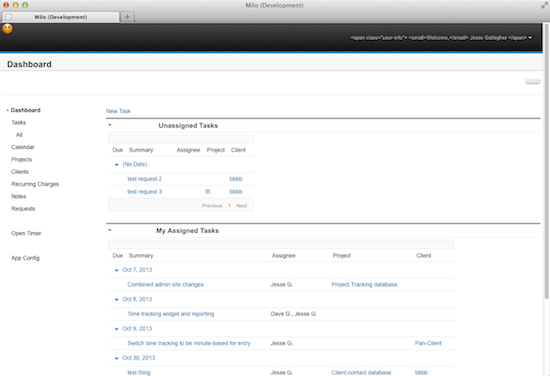
At a high level, the app is a fairly typical web app built using the popular-for-good-reason Ace - Responsive Admin Template theme from WrapBootstrap. I'm a huge fan of using these pre-built themes - in addition to handling the visual design, they tend to come packaged with a set of specialized widgets and jQuery plugins that are made to work well as a cohesive whole. However, the down side is that you have to write your code specifically targeting the framework, even moreso than stock Bootstrap (and for this reason, I couldn't directly use Bootstrap4XPages). This makes it a perfect candidate for renderer-ification, as most of the components I'm using - the layout, widget boxes, view panels/data tables, form layouts - have direct analogs in either the stock XPage runtime or in the OneUI-based components in the Extension Library.

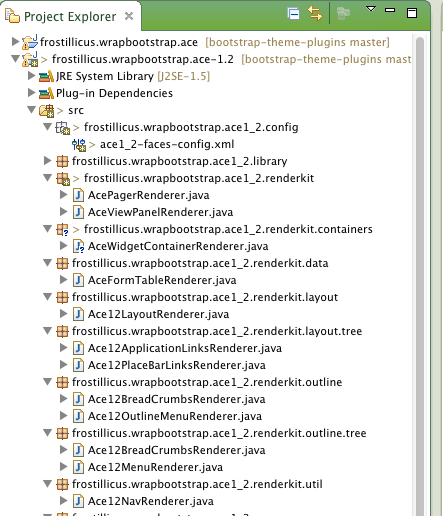
So what I have done is to take the basic structure of the Bootstrap4XPages project (and more than a smidge of its code) and used it to build custom renderers for the components I need, packaged into an OSGi plugin:

Project Explorer

It's something of a mess of code, and parts of it have been a pain to deal with, but for the most part it's been a process of looking at the original renderer source in the ExtLib and Bootstrap4XPages and then either copying and tweaking, subclassing and overriding, or implementing from scratch. I've run into some bothersome limitations in the stock objects as well, particularly when it comes to areas where I need to apply CSS classes to elements not represented in the components, like the FontAwesome-based icon classes for the nav bar or specific classes for widget title bars and the body area. Since these components also lack convenient "attr" properties, I've resorted to ugly hacks: I've co-opted the "imageAlt" property of the tree nodes to trigger creation of a Bootstrap-style "i" tag with a class for the navigator, and for the widgets I just made the styleClass apply only to the header and added an ugly exception to look for "no-padding" classes and apply them to the body instead. It's not a pretty process sometimes.

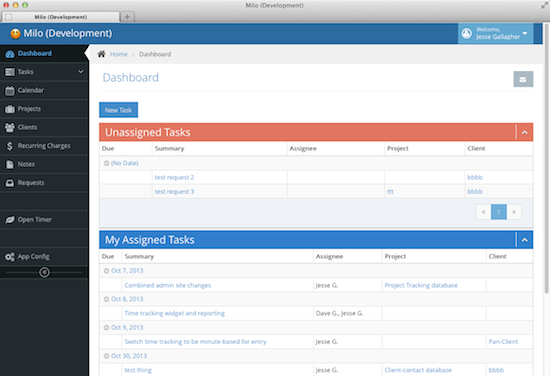
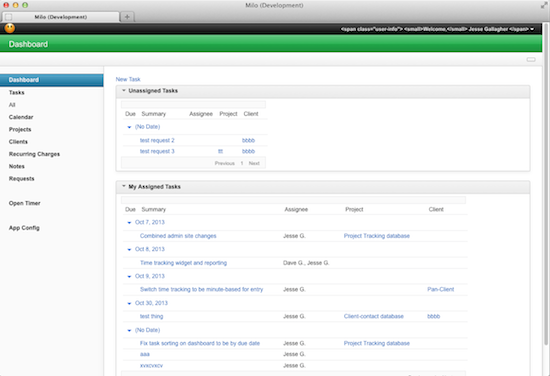
But the results are pretty interesting. By using standard components, I have an app that can swap readily between very different themes (with some rough edges for areas where code is still Ace-specific):

Ace

OneUI v2.1

OneUI v3.0.2

All of this does, of course, raise an important question. Namely: why bother? The original way I implemented it - by writing the Bootstrap layout HTML by hand, tweaking individual classes here and there, and forgoing the OneUI-based components - worked just fine, and it took less work. And really, I'm not terribly likely to suddenly decide that I want to switch this app from Ace to OneUI or stock Bootstrap. There are a couple important benefits to this approach that apply both to me personally and to others who may consider doing the same thing:

  • Practice. This seems odd to put first, but it's vitally important. Writing these renderers has improved my knowledge of the platform a great deal. It's given me a reason to delve further into the Extension Library source, to improve my OSGi-plugin-writing knowledge, and to familiarize myself with an easily-overlooked part of the JSF stack. Like many things with the plumbing of XPages, it's more of a PITA than it absolutely needs to be, but, if you do it, you'll come out a much better developer.
  • Focus. Now that I have almost all of the code that's specific to Bootstrap or Ace out of my XPage app, the remaining code has a sharpened focus on the task at hand. Now I use standard widget, pager, and view controls just like in any run-of-the-mill app and hook them up the same way, without having to worry about how it's going to look. Time spent on the problem at hand is time spent well.
  • Maintainability. During my transition from hardcoded HTML in the XSP source to custom renderers, I also jumped from Ace 1.0 to 1.2, which included an upgrade to Bootstrap 3. For this task, that meant I had to learn about a number of the differences between Bootstrap 2 and 3, as well as tweaking lots of little CSS classes and HTML structures across every page of the app. Next time, though, when Ace version 2 running with Bootstrap 4 comes out, I only need to change the theme, entirely outside of the app, and everything else will come along for the ride (mostly).
  • Less Code in the NSF. This is a corollary to the last bullet point, but is important as its own concept. By moving the theme and supporting files (like the CSS and JS assets themselves) out to a plugin, there's less cruft to carry around in the NSF itself and, more importantly, less stuff to keep up-to-date when used in common across multiple apps. This is not unique to this technique (you can move the resource files out without doing renderers, and you can bundle common custom controls that way too), but it's a valuable side effect.
  • Interoperability. This doesn't matter so much to me currently, since I'm the only one working on this app, but it will matter later, and it would matter immediately to any larger company. If each of your apps, regardless of the final appearance, is built using the standard XPage and ExtLib controls, that means you don't need to familiarize every developer working on it with the CSS framework of your choice, whether it be Bootstrap, your company's home-grown HTML, or something else entirely. You can have one person writing the themes and have the rest of the team go about building their apps by the book (or, rather, books).
  • Flexibility. As demonstrated by my screenshots above, this technique brings tremendous flexibility. In this specific case, I knew what theme I wanted to use when I started writing the app, but in the future I won't need to. Whenever I'm struck by inspiration for a new app, I can start writing code immediately (dressing it up in Ace or OneUI) and then decide on and buy another theme later without the hassle of going back into my functional XPages to replace and tweak a bunch of CSS classes.

It's a pity that there's such overhead in the initial work of writing custom renderers, but it will get gradually easier over time, now that Bootstrap4XPages is available to reference. And still, hassle and all, I believe this to be the best way forward for organized XPage development, and represents one of the platform's distinct advantages over others (well, the others that aren't JSF). I strongly encourage everyone to look at least a little into the idea. And I also, as always, encourage you to contact me at will either to pick my brain or commission my company to help renderer-ify or otherwise improve your apps.

Internalize This Deep Wisdom

Tue Nov 19 18:43:28 EST 2013

Tags: programming

Toby Samples tweeted earlier an old blog post by Jeff Atwood about the virtue of minimal code, and I think everyone would be well-served by reading it and the articles it links to (the Wil Shipley post has since moved (incidentally, if you don't currently pay attention to Wil Shipley, you really, really should)).

I've found maintaining the goal of reducing the conceptual weight of my code to be the most valuable tool in my belt. One way of doing that is to separate out unrelated concerns, letting you focus only on the task at hand, but the best way is to eliminate concerns from your code entirely. It's not entirely a matter of "don't reinvent the wheel" (if your whole project is the wheel, feel free to reinvent it), but rather more of a matter of not solving problems you don't have to solve. For example, have you seen the class ExtLibUtil? It solves tons of basic little problems that most XPages run across, such as getting the viewScope. Back when I learned about that, I dropped a bunch of my existing utility functions. I'm presently doing the same with StringUtil. Those are small problems that I have no business re-solving.

I could go on, but I think the links in the first paragraph cover it best anyway. Go read them!