Using Lombok to Write Cleaner Java in Designer
Fri Jul 06 18:48:00 EDT 2012
Java, as a language, has a number of admirable qualities, but succinctness is not among them. Even a simple "Person" class with just "firstName" and "lastName" properties can boil over with at least a dozen lines of boilerplate to add constructors, getters, setters, and equivalency testing. Fortunately, Project Lombok can help. Their main page contains a good video of the basics, while the Feature Overview page covers the rest. If you've written a lot of Java classes, I suspect that the video will have you hooked.
And there's good news: Lombok can work in Designer! It's not as simple as it is for vanilla Eclipse and it took me a good amount of trial-and-error to get it functional, but I figured out what you have to do:
- Copy lombok.jar into your Notes program directory (e.g. C:\Program Files\IBM\Lotus\Notes). It has to go there so that the initial program launch sees it.
- Additionally, copy the same lombok.jar to your jvm\lib\ext directory inside your Notes program directory. It has to go there so that it's on your project build path. Yes, normally you "shouldn't" put your Java libraries there, but I figure it's alright since this takes local, non-update-site fiddling anyway.
- Now for the weird part. Normally, the Lombok installer modifies eclipse.ini to launch some support stuff. That won't work for us, however. What we need is the file "jvm.properties" in the framework\rcp\deploy directory. The syntax isn't the same as for eclipse.ini and I'm not 100% sure my method doesn't have any horrible side effects, but adding these two lines (the two under "Lombok stuff", with "vmarg.javaagent" and "vmarg.Xbootclasspath/a") worked for me:
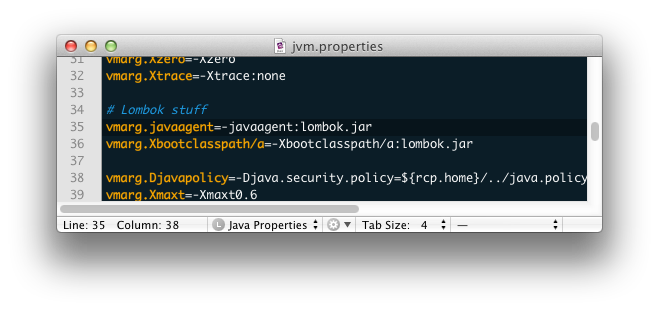
Now, I've only had this installed for a couple hours and have only done a couple basic tests, so I can't rule out the notion that this will interfere with some other Designer thing (the "Xbootclasspath/a" line may override some Designer default), so use with care. On the plus side, Lombok's magic works during compilation, not runtime, so you shouldn't need lombok.jar on the destination server. You'd still need it on the Designer client of any other programmers working on the code, though.
Update: I think you can avoid doubling up your copies of lombok.jar (and avoid a problem where launching the normal Notes client doesn't work) by just putting lombok.jar in jvm/lib/ext and using these lines in jvm.properties instead:
vmarg.javaagent=-javaagent:${rcp.home}/../jvm/lib/ext/lombok.jar
vmarg.Xbootclasspath/a=-Xbootclasspath/a:${rcp.home}/../jvm/lib/ext/lombok.jar